 Study Plan
2110 Topo
Study Plan
2110 Topo
What a 2110 Engineer Must Know: Implementing, Maintaining & Troubleshooting ST 2110-20
ST 2110-20 is the core standard for transporting uncompressed professional video over IP. It is the “video essence” part of the ST 2110 system. Success depends on deep knowledge across networking, timing, and media transport.
1. Core Concepts You Must Master
- Uncompressed video transport (no compression like JPEG XS or H.264)
- RTP/UDP multicast (one sender → many receivers)
- RTP timestamps derived from PTP (not wall clock time)
- ST 2110-21 traffic shaping (Narrow, Wide, and Full profiles)
- SDP (Session Description Protocol) files – the “contract” for each flow
How the ST 2110-20 Flow Works
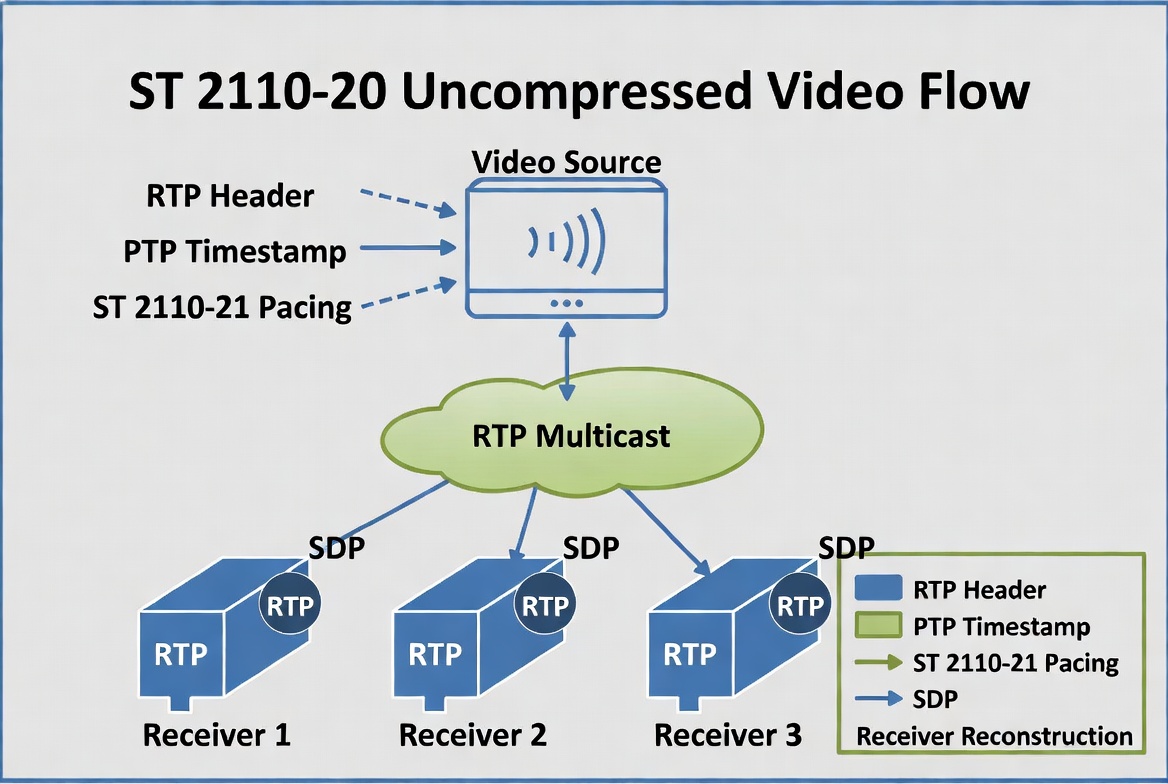
 ST 2110-20 defines the transport of uncompressed professional video over IP networks. Unlike traditional SDI, video is sent as separate IP packets that must be precisely timed using PTP.
- Video Source
A camera, server, or graphics system generates raw video frames. - Packetization
The video is broken into RTP/UDP packets. Each packet includes:- RTP Header (sequence number, payload type)
- PTP Timestamp – The exact time the frame was captured, referenced to the shared PTP clock
- Uncompressed video payload (typically 4:2:2 or 4:4:4)
-
ST 2110-21 Pacing
The sender uses strict traffic shaping (Narrow or Wide profile) to send packets at a smooth, predictable rate instead of large bursts. This prevents network congestion. - RTP Multicast
Packets are sent to a multicast IP address. Multiple receivers can subscribe to the same stream efficiently. - Receivers
Each receiver (multiviewer, monitor, switcher, recorder) joins the multicast group, buffers packets using the RTP timestamps, and reconstructs the original video using the common PTP clock.
2. Critical Knowledge Areas
✅ Timing & Synchronization
- ST 2059-1 / 2059-2 PTP profile
- Grandmaster, Boundary Clock, Transparent Clock roles
- One-step vs Two-step PTP
- Sync message rates (8 Hz or 16 Hz typical)
- How RTP timestamps are generated from PTP clock
✅ Networking & Fabric
- Leaf-Spine topology with ECMP
- Jumbo frames (MTU 9000+ end-to-end)
- IGMPv3 snooping + PIM-SSM (for routed networks)
- Strict QoS (PTP = CS6, Video = CS5/AF41)
- ST 2022-7 Red/Blue hitless redundancy
✅ Video-Specific Details
- Pixel formats (YCbCr 4:2:2, 4:4:4, RGB)
- Frame rates, interlaced vs progressive
- ST 2110-21 packet pacing & burst behavior
- SDP parameters (width, height, sampling, colorimetry)
3. Implementation Checklist with How-To Instructions
ST 2110-20 Key Parameters
Understanding the Critical Settings
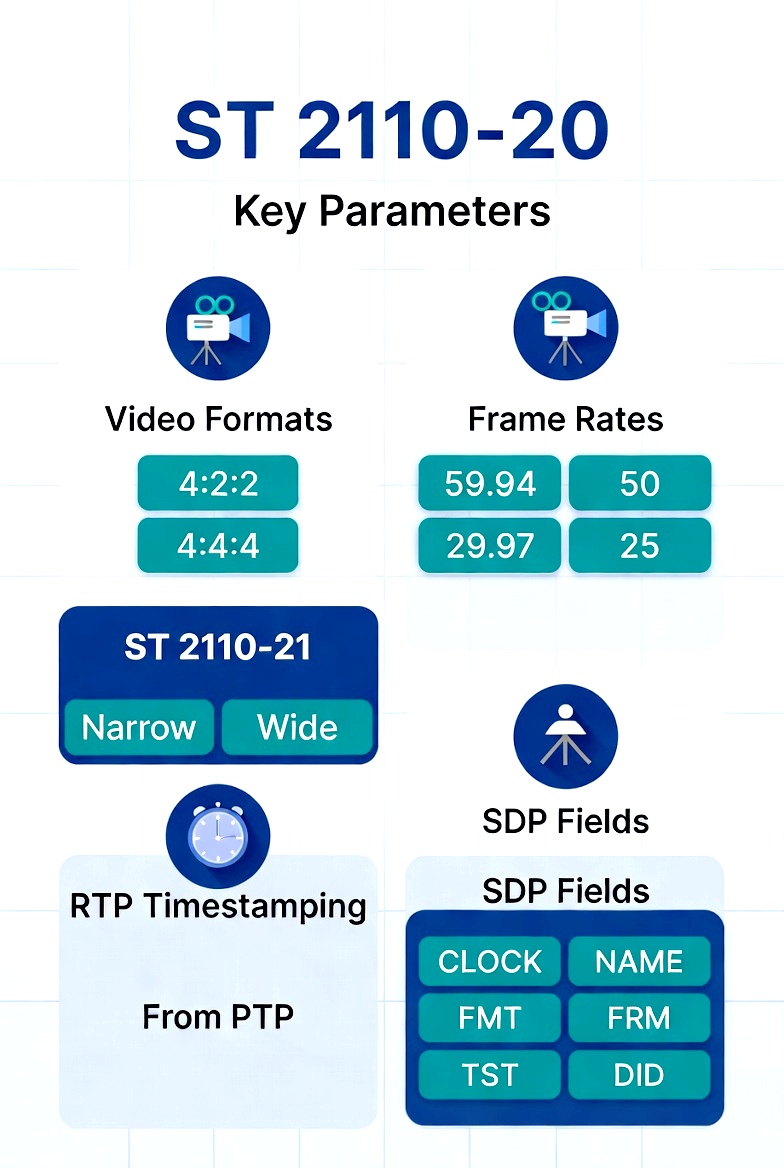
The graphic highlights the most important configurable parameters you must get right when implementing ST 2110-20 video flows:
Video Formats
4:2:2 – Most common for broadcast (efficient)
4:4:4 – Used for high-end graphics and chroma-keying
Frame Rates
59.94 / 50 fps (most common)
29.97 / 25 fps (common for slower content)
Others like 23.98, 60, 30 also supported
ST 2110-21 Traffic Shaping
Narrow – Strictest pacing, lowest network impact
Wide – More tolerant of bursts, easier on some hardware
RTP Timestamping
All timestamps are derived from the shared PTP clock (ST 2059), not the local computer clock. This is what keeps video in sync with audio and ancillary data.
SDP Fields (The Contract)
The graphic also shows the most important SDP parameters that define each 2110-20 flow:
- CLOCK – Usually 90000 for video
- FMT – Format (e.g., raw video)
- FRM – Frame rate and structure
- TST – Timestamp type
- DID / SDID – For ancillary data mapping
Here’s a practical, step-by-step guide that a 2110 engineer follows when bringing ST 2110-20 video flows online.
- Validate PTP Lock and Offset (< 1 µs) on All Devices
- Connect to each switch, server, and endpoint.
- On switches: Run
show ptp clockor equivalent to confirm Grandmaster is selected and offset is stable. - On servers/NICs (Windows): Use Meinberg PTP Monitor or
mlx5cmdto check PHC offset. - On Linux endpoints: Use
pmcorptp4lstatus. - Goal: Consistent sub-microsecond offset (< ±1 µs) under load. If drifting, check Transparent/Boundary Clocks and cable lengths.
- Confirm End-to-End MTU and Jumbo Frame Support
- Set switch ports to MTU 9216 (or maximum supported).
- Set server NICs to MTU 9000–9014.
- Test with:
ping -M do -s 8972 [destination](Linux) orping -f -l 8972 [destination](Windows). - Verify no fragmentation across the full path (including Red/Blue legs).
- Generate and Verify SDP Files
- Use your control system (or manually) to generate SDP for each 2110-20 flow.
- Key parameters to check:
width,height,sampling,depth,colorimetry, RTP payload type, multicast address, and clock rate (90000 for video). -
Validate SDP using tools like
sdpokeror Wireshark’s SDP inspector. - Confirm the receiver can parse and subscribe to the flow.
-
Use NMOS IS-04 (Discovery) + IS-05 (Connection Management)
- Deploy an NMOS Registry (e.g., AMWA NMOS or vendor solution).
- Ensure all devices register themselves via IS-04.
- Use IS-05 to create connections: Sender → Receiver with proper SDP transport.
- Verify devices appear in the NMOS GUI and can be routed dynamically.
- Configure Proper QoS and Multicast Routing
- Mark PTP traffic as CS6 (highest strict priority).
- Mark 2110-20 video as CS5 or AF41 with proper shaping.
- Enable IGMPv3 snooping + Querier on all switches.
- If routing between subnets, configure PIM-SSM with 232.0.0.0/8 range.
- Apply per-port storm control and multicast group limits.
- Test with Known Good Receivers
- Start with professional multiviewers (e.g., Lawo, Grass Valley, Ross) and recording devices that support ST 2110-20.
- Verify clean video, correct colorimetry, and stable timing.
- Perform stress tests: Pull one leg of 2022-7, add/remove flows, and simulate network jitter.
- Monitor for packet loss, RTP timestamp continuity, and lip-sync accuracy.
Pro Tip: Always bring up PTP first and prove it’s stable (<1 µs offset) before sending any 2110-20 video. Timing problems are the #1 cause of mysterious video issues in ST 2110 systems.