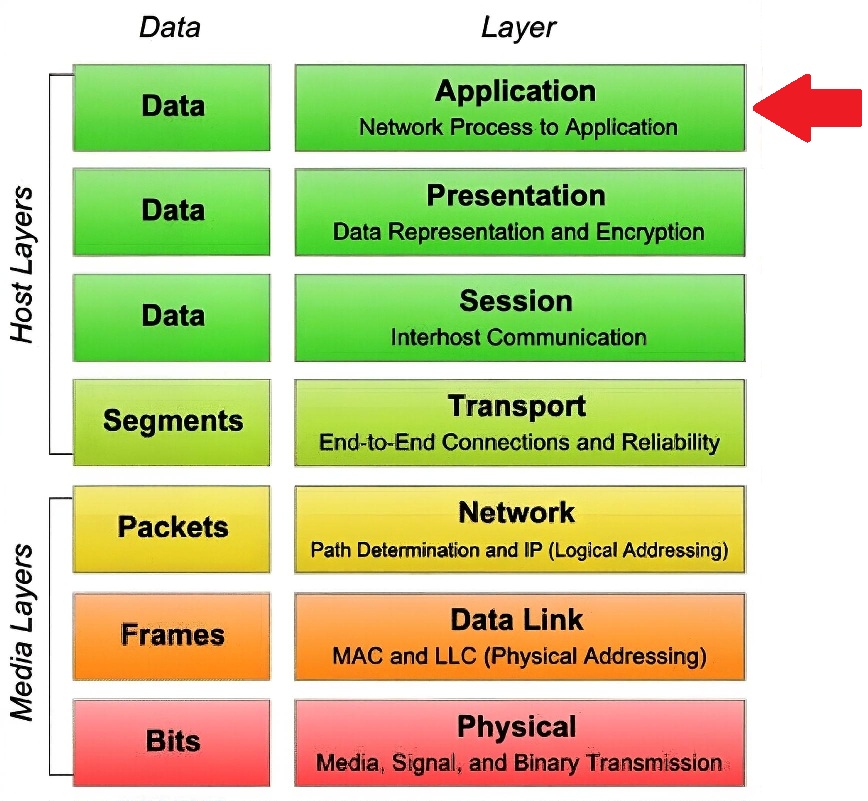
An application layer firewall (also called an application proxy firewall, application-level gateway, or proxy firewall) is inserted between applications/processes and the lower network layers (transport, network, etc.) by acting as an intermediary or broker for communication. It breaks the direct connection path that lower-layer firewalls (like packet filters or stateful inspection firewalls) allow.
How Firewall Insertion Works
No Direct Connection Allowed
Normal applications on a client or server would directly bind to sockets in the OS network stack (TCP/UDP) and send/receive data through the lower layers (Layer 4 → Layer 3 → Layer 2).
An application layer firewall prevents this direct path. Instead, applications are forced to talk to the proxy (the firewall) rather than the real remote endpoint.
Proxy Architecture – Two Separate Connections
The firewall runs a proxy process (or set of processes) for each supported application protocol (HTTP, FTP, SMTP, etc.).
When a client application wants to connect (e.g., a web browser requesting a page):
The client is configured to use the proxy (explicitly via proxy settings or transparently via network redirection).
The client opens a connection to the proxy (first TCP session).
The proxy authenticates/authorizes the request, inspects the full application-layer content (e.g., HTTP headers, URLs, payloads for malware/SQL injection), and decides whether to allow it.
If allowed, the proxy opens a separate, independent connection to the real destination server (second TCP session).
The proxy relays data bidirectionally between the two sessions, but the client and server never directly communicate.
→ This creates two distinct network sessions instead of one end-to-end connection. The firewall "sits in the middle" at the application level.
Where It Fits in the Stack
On the client side: Applications are pointed to the proxy (via config, WPAD, transparent interception, or network policy). The OS network stack still handles lower layers, but the application data never goes directly out.
On the server side (reverse proxy / WAF scenario): The proxy listens on the public IP/port (e.g., port 80/443), terminates incoming connections, inspects application data, then forwards to internal servers on private IPs/ports.
The firewall's proxy operates above the transport layer: it fully understands and parses the application protocol (Layer 7), while lower layers (TCP/IP) are handled normally but split into two halves.
Key Benefits of this Insertion
Deep inspection: Can read/modify application data (e.g., block malicious URLs, strip scripts, enforce protocol compliance).
Strong isolation: Client and server never see each other's real IP addresses or establish a direct session → hides internal network topology.
Protocol validation: Ensures the traffic strictly follows the expected application rules (e.g., valid HTTP syntax).
No lower-layer bypass: Malformed or tunneled traffic at Layer 7 is caught even if it looks normal at Layers 3–4.
Trade-offs
Performance/latency: Proxying adds overhead (two connections, full payload inspection, possible decryption/re-encryption for TLS).
Limited protocols: Only supports applications the proxy understands (HTTP, FTP, SMTP, etc.); custom or encrypted protocols may not work without decryption.
In contrast, packet-filtering or stateful firewalls (Layers 3–4) let applications connect directly and only filter based on headers/ports/state — they do not insert themselves as a full intermediary at the application layer.
This proxy-based "insertion" is why application layer firewalls provide the deepest, most context-aware protection but are more resource-intensive than lower-layer firewalls.

 Study Plan
2110 Topo
Study Plan
2110 Topo
 Proxy Architecture – Two Separate Connections
