802.1X
IEEE 802.1X (often just called 802.1X or dot1x) is an IEEE standard for port-based Network Access Control (PNAC). It provides a framework to authenticate and authorize devices (or users) before they can access a local area network (LAN) — whether wired (Ethernet) or wireless (Wi-Fi).
In simple terms:
It acts like a security guard at every network port (physical Ethernet switch port or wireless access point). A device can't send or receive normal traffic until it proves its identity. This prevents unauthorized devices (rogue laptops, hacked IoT gear, or someone plugging in a cable) from joining the network and potentially causing harm, stealing data, or disrupting operations.
Key Components (The Three Main Roles)
802.1X involves three parties working together:
- Supplicant — The client device trying to connect (e.g., your laptop, phone, IP camera, or broadcast endpoint). It runs software (like wpa_supplicant on Linux or built-in supplicant in Windows/macOS) that provides credentials.
- Authenticator — The network device controlling the port, typically an Ethernet switch or wireless access point. It acts as the middleman: it blocks traffic until authentication succeeds but allows limited "authentication traffic" through.
- Authentication Server — Usually a RADIUS server (sometimes Diameter or others). This is the trusted backend that actually checks credentials against a database (Active Directory, LDAP, certificate store, etc.) and tells the authenticator whether to allow access.
How 802.1X Works (High-Level Flow)
- A device (supplicant) connects to a switch port or associates with a Wi-Fi AP (authenticator).
- The authenticator keeps the port in an unauthorized state:
- Only EAPOL (EAP over LAN) frames are allowed — normal data/IP traffic is blocked.
- This uses two logical "ports" on the authenticator:
- Uncontrolled port — Always open for EAPOL authentication messages.
- Controlled port — Blocked until authorization succeeds.
- The supplicant and authenticator exchange authentication messages using Extensible Authentication Protocol (EAP) encapsulated in EAPOL.
- The authenticator forwards the EAP messages (wrapped in RADIUS) to the authentication server.
- The server validates credentials (e.g., username/password, digital certificate via EAP-TLS, or other methods like PEAP, TTLS).
- If valid → Server sends "success" → Authenticator opens the controlled port → Full network access is granted (often with dynamic VLAN assignment, ACLs, or QoS based on policy).
- If invalid → Access denied (port stays blocked or moves to a guest VLAN).
Common EAP Methods in 802.1X
- EAP-TLS — Certificate-based (very secure, mutual authentication; gold standard for enterprises).
- PEAP or EAP-TTLS — Username/password tunneled over TLS (common with AD credentials).
- EAP-TTLS/PAP or others — Various legacy or specific setups.
Why It's Important
- Prevents unauthorized access at the edge — far better than just MAC filtering or open ports.
- Supports per-user/device policies — e.g., assign finance laptops to one VLAN, guest devices to another, or IoT to isolated segments.
- Works for both wired and wireless — Foundation of WPA2/WPA3-Enterprise (not WPA-Personal's shared passphrase).
- Scalable for enterprises — Integrates with central identity systems.
In broadcast and media facilities (e.g., SMPTE ST 2110 or NMOS environments), 802.1X is often used to secure IP-based infrastructure: ensuring only trusted cameras, playout servers, or control panels can join the media network, reducing risks in shared or remote production setups.
The current version is IEEE 802.1X-2020, which builds on earlier revisions with better support for MACsec encryption and modern authentication.
Access Control List
n networking and security contexts (especially relevant to the broadcast/media IP workflows we've been discussing), an ACL is a set of rules that controls which traffic is permitted or denied on a network device (e.g., router, switch, firewall).
Key Types of ACLs
- Standard ACL
- Filters based only on source IP address. Simple but limited (e.g., "allow traffic from 192.168.10.0/24").
- Extended ACL
- Source and destination IP
- Protocol (TCP, UDP, ICMP, etc.)
- Port numbers
- Other flags (e.g., TCP SYN)
- Example: "permit UDP from any to 239.0.0.0/8 eq 5004" (allow ST 2110 multicast RTP traffic).
- MAC ACL / Port ACL
- Operates at Layer 2: filters based on source/destination MAC addresses.
- Useful on switches to restrict devices before they even get an IP.
- VLAN ACL (VACL) / Port ACL (PACL)
- Applied to VLANs or individual switch ports for finer L2/L3 control.
- Rules are processed top-down (first match wins).
- Each rule ends with an implicit deny any any (if no match → traffic is dropped).
- Applied inbound or outbound on interfaces.
- Common actions: permit (allow), deny (block), log (record matches).
- Protect multicast groups (e.g., allow only specific sources to send to 239.x.x.x addresses for ST 2110 essence streams).
- Segment traffic (e.g., isolate NMOS control traffic from media essence).
- Mitigate DoS/spoofing (block unauthorized sources, limit broadcast/multicast storms).
- Enforce security zones (e.g., allow NMOS IS-04/05 traffic only from trusted controller subnets).
- Often combined with 802.1X, MACsec, or RBAC for layered defense.
-
More granular: filters on
How ACLs Work (Typical Flow)
Relevance in Media/Broadcast Networks
In Cisco/Juniper/Arista gear common in broadcast facilities, ACLs are a fundamental building block for secure IP infrastructure.
Ansible/NETCONF
Ansible is an open-source automation tool widely used for configuration management, application deployment, and network automation. It is agentless (no software needed on target devices), uses simple YAML playbooks, and connects via SSH (or other protocols) to push configurations idempotently (safe to run multiple times).
NETCONF (Network Configuration Protocol) is a standardized network management protocol defined by the IETF (RFC 6241). It runs over SSH (port 830 by default) and uses XML-encoded RPCs (Remote Procedure Calls) to interact with devices. Key features include:
- Structured configuration/retrieval (get-config, edit-config, commit/rollback).
- Support for YANG data models (defines device config/operational state in a machine-readable way).
- Transactional operations (candidate config, confirmed commit, etc.).
- Designed for programmatic, reliable network device management (replacing or supplementing CLI scripting).
How Ansible and NETCONF Work Together
Ansible integrates NETCONF as one of its connection methods and modules for modern network automation (especially on devices like Cisco IOS-XE/IOS-XR, Juniper Junos, Nokia SR OS, Arista EOS, etc., that support NETCONF + YANG).
- Connection plugin: ansible.netcommon.netconf — Establishes a persistent NETCONF session over SSH instead of traditional CLI
- Main modules:
- netconf_get: Retrieve running/candidate config or operational data (as XML).
- netconf_config: Push XML configuration snippets (often generated via Jinja2 templates from YAML vars).
- netconf_rpc: Send custom RPCs.
- More structured/reliable (no parsing messy CLI output).
- Better for complex, model-driven configs.
- Transactional safety (edit candidate, validate, commit).
- Vendor-agnostic when using standard YANG models.
Quick Example Workflow (Ansible + NETCONF)
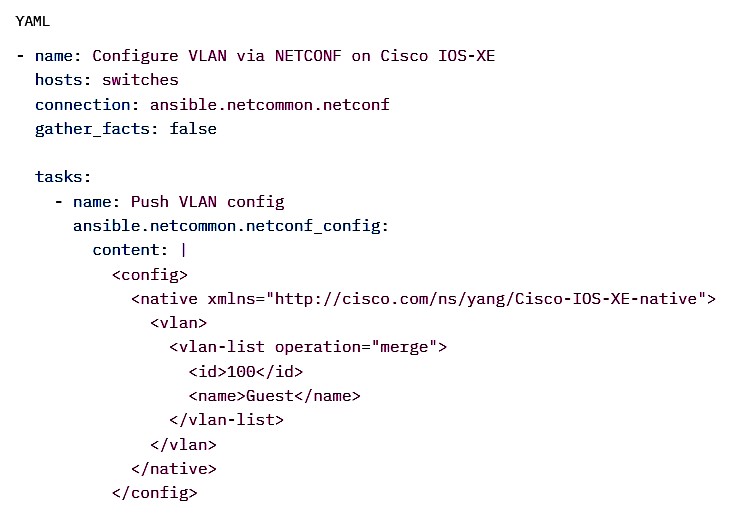
In short: Ansible = the automation orchestrator/tool. NETCONF = the modern, structured protocol it uses to talk to capable network devices (instead of just SSH + CLI commands). Together they enable powerful, model-driven network automation.
BMCA spoofing
BMCA spoofing (or Best Master Clock Algorithm spoofing) is a type of attack targeting IEEE 1588 Precision Time Protocol (PTP) networks, including those used in broadcast/media facilities (e.g., SMPTE ST 2110 for IP-based video/audio sync via PTP).
In PTP, the BMCA is the distributed algorithm that all clocks run to elect the best clock (usually a Grandmaster) as the time reference. Each clock advertises its attributes via Announce messages — priority values (Priority1/Priority2), clockClass, clockAccuracy, variance, identity, etc. — and compares them to decide who should be master.
BMCA spoofing involves an attacker (rogue device or compromised node) sending forged or manipulated Announce messages with exaggerated "better" attributes (e.g., lowest possible Priority1 value, highest clockClass, fake high-accuracy claims) to trick legitimate clocks into electing the attacker (or a malicious clock) as the new Grandmaster.
Impact
- Once elected, the rogue Grandmaster sends false synchronization messages (Sync, Follow_Up, etc.).
- All downstream slaves synchronize to the attacker's bogus time → causing time offset, jitter, frame drops, or desynchronization across the network.
- In media workflows: Could break lip-sync, disrupt ST 2110 essence streams, ruin multi-camera genlock, or crash time-sensitive NMOS/PTP-dependent control.
This is often called a "rogue master" or "grandmaster spoofing" attack via BMCA manipulation. It's an internal/advanced persistent threat (requires network access, e.g., via MitM, compromised endpoint, or L2 spoofing like ARP poisoning).
Basic Mitigations
- Authentication — Use IEEE 1588-2019 Annex K (group/pre-shared keys, though limited adoption) or emerging extensions.
- Encryption — MACsec on L2 links to prevent injection/spoofing of PTP frames.
- Redundancy — Multiple Grandmasters + Global-BMCA (G-BMCA) (IEEE 1588-2019) with majority voting or cross-checks against alternate sources (GNSS, IRIG).
- Monitoring — Detect anomalies in clock attributes, unexpected master changes, or time jumps vs. local/reference clocks.
- Network controls — 802.1X, port security, segmentation to limit rogue device placement.
It's a serious threat in critical timing infrastructures (power grids, broadcast, finance), but layered defenses (like those in ST 2059/SMPTE docs) significantly reduce risk.
Secure CLI
Secure CLI refers to a command-line interface (CLI) that is protected against unauthorized access, eavesdropping, tampering, and common attacks, ensuring safe remote or local administration of systems (e.g., servers, switches, NMOS nodes, PTP grandmasters in broadcast environments).
Key Characteristics of a Secure CLI
- Encrypted communication — All sessions are encrypted end-to-end (no plaintext passwords or commands sent over the wire).
Primary protocol: SSH (Secure Shell, version 2 only). - Strong authentication — Replaces weak password-only logins with:
- Public-key authentication (recommended: Ed25519 or RSA 4096-bit keys).
- Optional: Multi-factor authentication (MFA/2FA via hardware tokens, TOTP, or certificates).
- Certificate-based auth (e.g., SSH certificates signed by a CA).
- No legacy/insecure protocols — Avoids Telnet, rlogin, FTP, or unencrypted serial console access over networks.
- Hardened configuration:
- Disable root login (or password-based root).
- Restrict allowed users/groups.
- Use non-default port (e.g., 2222 instead of 22) if externally exposed.
- Enforce strong ciphers, key exchange algorithms, and MACs (disable weak ones like MD5, 3DES).
- Limit login attempts (e.g., via fail2ban, denyhosts, or sshd_config MaxAuthTries).
- Session protections:
- Idle timeout (ClientAliveInterval / ClientAliveCountMax).
- No command history leakage.
- Logging of all commands (audit trail) via syslog or tools like snoopy/auditd.
- Privilege management:
- Use sudo with fine-grained rules (visudo) instead of direct root access.
- Role-based restrictions (e.g., allow only specific commands via restricted shells or sudoers).
In Broadcast/Media IP Contexts (ST 2110 / NMOS)
Secure CLI is critical for:
- Managing Linux-based encoders, playout servers, or NMOS registries.
- Configuring switches/routers for multicast, QoS, PTP.
- Troubleshooting PTP grandmasters or NMOS nodes remotely without exposing credentials.
- Complying with facility security policies (e.g., EBU recommendations).
Quick Best Practices Summary
- Use SSH key-based auth only (disable password auth in sshd_config).
- Keep OpenSSH updated.
- Use tools like ansible or ansible-pull for automated, audited config changes instead of manual CLI.
- Monitor SSH logs for anomalies.
In short: A secure CLI = SSH with strong keys, hardened config, and no weak legacy access — the standard way to safely administer networked devices today.
DHCP
DHCP (Dynamic Host Configuration Protocol) is a network management protocol used to automatically assign IP addresses and other network configuration parameters to devices (clients) on a network, so they can communicate without manual setup.
It eliminates the need for admins to statically configure every device (laptop, phone, camera, server, etc.) with an IP address, subnet mask, default gateway, DNS servers, etc.
How DHCP Works (Basic Flow)
- DHCP Discover
Client broadcasts a DHCPDISCOVER message (UDP port 67/68) asking: "Any DHCP servers out there? I need an IP!" - DHCP Offer
One or more DHCP servers respond with a DHCPOFFER containing a proposed IP address, lease time, subnet mask, gateway, DNS, etc. - DHCP Request
Client broadcasts a DHCPREQUEST saying: "I'll take the offer from server X" (to let other servers know to release their offers). - DHCP Acknowledge (DHCPACK)
Server sends DHCPACK confirming the lease: "You're good to go with this IP for X hours/days."
(If declined or issues, server might send DHCPNAK.)
This is the classic DORA process: Discover → Offer → Request → Acknowledge.
Key Elements DHCP Provides
- IP address (from a pool, e.g., 192.168.1.100–192.168.1.200)
- Subnet mask
- Default gateway (router IP)
- DNS server(s)
- Lease time (how long the IP is reserved; client must renew before expiry)
- Optional extras: NTP servers, TFTP server (for PXE boot), domain name, etc.
Common DHCP Modes/Scenarios
- Dynamic allocation — Most common; IPs leased temporarily.
- Automatic allocation — Server assigns permanent IP (like static but auto-managed).
- Manual/reserved allocation — Admin reserves specific IP for a MAC address (MAC reservation).
- Relay agents — In large networks, DHCP relay (IP helper) forwards broadcasts to a central DHCP server across subnets.
Relevance in Broadcast/Media IP Networks (e.g., ST 2110/NMOS)
- Devices like cameras, encoders, playout servers, NMOS nodes need quick, reliable IP assignment.
- DHCP ensures endpoints get IPs fast during setup or power-up.
- In production environments, use DHCP reservations (by MAC) for critical devices to get predictable IPs.
- Combine with 802.1X for secure authentication before getting an IP.
- Watch for rogue DHCP servers (MitM risk) — attackers can hand out bad gateways or DNS to redirect traffic.
Security Considerations
- Rogue DHCP servers → MitM or DoS.
- DHCP starvation attacks (exhaust IP pool with fake MACs).
- Mitigations: DHCP snooping on switches, trusted server ports, rate limiting, IP source guard.
In short: DHCP is the "plug-and-play" for IP networking — devices join the network, get configured automatically, and start communicating. Without it, every device would need manual IP setup, which is impractical in modern (especially large media) facilities.
DHCP options for PTP domain
DHCP options for PTP domain refer to DHCP configuration parameters that can automatically provide PTP (Precision Time Protocol, IEEE 1588)-related settings to clients (e.g., endpoints, cameras, or nodes in SMPTE ST 2110 media networks) during IP assignment.
There is no standard, IANA-registered DHCP option specifically for the PTP domain number (a value from 0–255 that groups PTP clocks into independent timing domains).
Common Practices in Broadcast/Media (ST 2110 / AES67)
- PTP domain number is typically statically configured on devices (e.g., domain 0 for AES67 default profile, domain 127 for SMPTE ST 2059-2 profile in ST 2110 setups).
- Many vendors and facilities avoid relying on DHCP for this because:
- All devices in a timing domain must match the domain number for synchronization to work.
- Mismatches cause slaves to ignore grandmasters or fail sync.
- Manual/static config or device profiles ensure consistency.
Related DHCP Options for Time Sync
While not domain-specific, DHCP can provide time-related servers useful for PTP-aware clients or hybrid setups:
- Option 42 — NTP servers (list of IP addresses for Network Time Protocol fallback or non-PTP devices).
- Option 4 — Time Protocol servers (RFC 868, legacy, rarely used today).
- Some proprietary or vendor-specific implementations (e.g., in Domain Time II software) use custom DHCP options or vendor extensions to push PTP grandmaster IPs or profiles, but these are not standardized and not interoperable across vendors.
Recommendations for ST 2110 / NMOS Environments
- Use DHCP reservations (MAC-based fixed IPs) for predictable addressing of PTP slaves/grandmasters.
- Statically configure PTP domain, profile (AES67 vs. SMPTE ST 2059-2), announce intervals, etc., via device UI, config files, or NMOS IS-09 system parameters where supported.
- For discovery of grandmasters: Rely on PTP Announce messages (multicast) rather than DHCP.
- In secure setups: Combine with 802.1X (for authenticated IP assignment) and MACsec on L2 links.
In short: There are no official DHCP options for PTP domain number — it's usually handled statically or via profiles to guarantee reliable timing across the facility. If your setup uses a specific vendor (e.g., Tektronix, Clear-Com, or Cisco), they might have proprietary ways; let me know for more details!
Docker container
A Docker container is a lightweight, standalone, executable package that includes everything needed to run an application reliably: the code, runtime, libraries, system tools, and dependencies.
Key points:
- It's created from a Docker image (a read-only template/blueprint).
- When you run the image (e.g., via docker run), it becomes a live container — an isolated running process.
- Containers share the host operating system's kernel (no full guest OS like a virtual machine), making them fast, efficient, and low-overhead.
- They provide strong isolation: each container runs in its own user space with its own filesystem, processes, network, etc., so apps don't interfere with each other or the host.
- Benefit: "It works on my machine" → consistent behavior across dev, test, production, cloud, laptops, servers, etc.
Analogy
Think of a shipping container: standardized, portable, self-contained (has what the cargo needs), runs the same anywhere (ship, truck, train), isolated from other cargo.
Quick comparison to VMs
- VM: Heavy (full OS + hypervisor), emulates hardware → slow startup, high resource use.
- Docker container: Lightweight (only app + deps), shares host kernel → starts in seconds, uses far less RAM/CPU.
Docker popularized containers (via Docker Engine), but the concept is now standardized (e.g., OCI runtime spec), so tools like Podman, containerd, etc., also run similar containers.
In short: Docker containers let you package apps "once, run anywhere" with isolation, portability, and efficiency.
DoS attacks
DoS (Denial of Service) attacks are malicious attempts to make a network service, server, website, API, or device unavailable to its legitimate users by overwhelming it with traffic or exploiting vulnerabilities to crash it.
The core goal is disruption, not data theft — attackers flood or break the target so normal users can't access it (e.g., a broadcast playout server stops responding, a streaming endpoint drops frames, or an NMOS registry becomes unreachable).
Main Types of DoS Attacks
- Volumetric DoS
- Floods the target with massive amounts of traffic to saturate bandwidth or resources.
- Examples: UDP floods, ICMP floods (ping floods), DNS amplification.
- Common scale today: tens to hundreds of Gbps (or even Tbps in large attacks).
- Mitigation: traffic scrubbing, rate limiting, cloud DDoS protection (Cloudflare, Akamai, AWS Shield).
- Protocol DoS
- Exploits weaknesses in network protocols to tie up resources without needing huge volume. Examples:
- SYN flood (half-open TCP connections exhaust server backlog).
- Slowloris (slow HTTP requests keep connections open).
- NTP/SSDP/DNS amplification (spoofed requests make third-party servers flood victim).
- Mitigation: SYN cookies, connection timeouts, protocol hardening.
- Application-Layer DoS (Layer 7)
- Targets the application itself (e.g., HTTP, SIP, NMOS APIs) with seemingly legitimate requests.
- Examples:
- HTTP floods (GET/POST spam).
- XML/JSON bomb payloads that consume CPU/memory parsing.
- Login brute-force or credential stuffing that overwhelms auth systems.
- Mitigation: WAFs (Web Application Firewalls), rate limiting per IP/user, behavioral analysis, CAPTCHA.
- Distributed DoS (DDoS)
- Most real-world DoS attacks today are DDoS — coordinated from thousands to millions of compromised devices (botnets: Mirai, Moobot, etc.).
- Makes mitigation harder because traffic comes from many legitimate-looking sources.
Quick Real-World Impact Examples (Media/Broadcast Context)
- A volumetric DDoS on a contribution feed encoder could drop live video streams.
- An application-layer attack on an NMOS IS-04 registry could prevent devices from discovering/ registering sources, breaking routing in an ST 2110 facility.
- Slow DoS on a control system UI could lock out operators during a live event.
Basic Defenses
- On-premises: Firewalls with rate limiting, IPS/IDS, redundant links.
- Cloud/edge: DDoS scrubbing services, anycast routing, geo-blocking suspicious regions.
- Application: API rate limiting, authentication throttling, monitoring for abnormal patterns.
- General: Keep firmware/OS patched, disable unused services, use 802.1X/MACsec/TLS to reduce attack surface.
DoS attacks remain one of the most common and persistent threats because they're relatively easy to launch (DDoS-for-hire services exist for as little as $10/hour) but can cause significant downtime and cost.
DSCP CS5/AF41 for media
CS5 and AF41 are common DSCP (Differentiated Services Code Point) values used in QoS (Quality of Service) to prioritize different types of media traffic over IP networks, especially VoIP, video conferencing, and real-time applications.
Quick Breakdown
- DSCP values (0–63) mark IP packets so routers/switches can apply prioritized queuing, low latency, low jitter, and controlled drop behavior during congestion.
- Both are in the high-priority range (Precedence 4–5 equivalent), but they serve different purposes.
CS5 (DSCP 40, binary 101000)
- Class Selector 5 (CS5) — part of the Class Selector PHBs (RFC 2474), designed to be backward-compatible with old IP Precedence.
- Commonly used for:
- Broadcast video (e.g., IPTV, live streaming one-to-many).
- Signaling/control traffic in some systems (e.g., Zoom, Cisco, or legacy VoIP signaling).
- Occasionally video media in specific apps (e.g., Zoom screen sharing or video fallback).
- Treatment: High priority but not as strict as EF; often gets CBWFQ (Class-Based Weighted Fair Queuing) with generous bandwidth and low drop probability.
- Not ideal for ultra-low-latency interactive media.
AF41 (DSCP 34, binary 100010)
- Assured Forwarding Class 4, Low Drop Probability (AF41) — from Assured Forwarding PHB group (RFC 2597).
- AFxy format: x = class (higher = more important), y = drop precedence (1 = lowest drop prob, 3 = highest).
- Standard/recommended for interactive video and multimedia conferencing (e.g., video calls in Teams, Webex, Zoom video, Cisco Unified CM video telephony).
- Treatment:
- Placed in a CBWFQ queue (not strict priority like voice).
- Assured bandwidth with WRED (Weighted Random Early Detection) — AF41 drops last in its class during congestion.
- Allows rate adaptation (video codecs can reduce bitrate if loss occurs) while keeping good quality.
- Why AF41 for video? Video is bursty and higher bandwidth than voice but still needs low loss/jitter; strict priority (like EF) could starve other traffic if overused.
Standard Recommendations (e.g., Cisco, Microsoft Teams, Zoom, RFC 4594)
- Voice / Telephony (VoIP audio) → EF (46) — strict priority queue (LLQ/PQ), ultra-low latency/jitter.
- Interactive Video / Multimedia Conferencing → AF41 (34) — CBWFQ with assured forwarding.
- Broadcast Video → CS5 (40) or sometimes CS4 (32).
- Signaling → Often CS3 (24) or CS5 (40), depending on vendor.
In practice:
- Use EF for audio-only real-time media.
- Use AF41 for video media in calls/conferences (most common for "media" beyond pure voice).
- Some apps (e.g., Zoom) may mark video/screen sharing as CS5 or AF41 depending on type.
- Always trust endpoint markings where possible, or re-mark at network ingress.
This ensures voice stays crystal clear (EF priority) while video gets reliable bandwidth without monopolizing the link (AF41 assured class). Let me know if you want QoS config examples for Cisco/MikroTik!
DSCP CS6 for PTP
QoS (Quality of Service) is a set of techniques used in IP networks to prioritize certain types of traffic over others, ensuring low latency, minimal jitter, and reliable delivery for time-sensitive or critical packets — especially important in broadcast/media environments like SMPTE ST 2110, where PTP (IEEE 1588) provides sub-microsecond clock synchronization for video/audio streams.
DSCP and PTP
- DSCP (Differentiated Services Code Point) is a 6-bit field in the IP header (values 0–63) that marks packets for QoS treatment.
- Switches/routers use these markings to place packets into priority queues (e.g., high-priority queues get serviced first with strict priority or weighted scheduling).
For PTP traffic (Announce, Sync, Follow_Up, Delay_Req/Resp, etc. messages), the goal is to minimize delay variation and packet loss, as even small jitter can cause timing drift and desync in ST 2110 workflows.
DSCP CS6 for PTP
- CS6 = DSCP value 48 (binary 110000, Class Selector 6, Internetwork Control PHB).
- It provides high priority (often queue 1 or network-control level), above most user traffic but below the absolute highest (CS7=56 or EF=46 in some cases).
- CS6 is commonly used for PTP in:
- RAVENNA (one of the AoIP standards influencing AES67/ST 2110).
- Some Dante implementations (especially older/legacy PTPv1 or specific configs, where PTP gets CS6/56 and audio gets EF/46).
- Certain vendor defaults or profiles for network control traffic.
Common Recommendations in Modern ST 2110 / AES67
- AES67 standard recommends DSCP EF (46) for PTP clock/event messages (Expedited Forwarding PHB — highest priority, low-latency queue) and AF41 (34) for RTP audio media.
- Many SMPTE ST 2110 deployments follow AES67 markings: PTP → EF (46).
- Cisco PTP configs often default to or recommend EF (46) for PTP event messages.
- Linux ptp4l allows configurable DSCP: e.g., dscp_event=46 (EF) or 48 (CS6) for event messages.
In practice:
- Use CS6 (48) if your facility/profile (e.g., RAVENNA-based or legacy Dante) marks PTP this way — ensure switches treat CS6 as high-priority.
- Prefer EF (46) for new AES67/ST 2110 setups — it's the most common modern recommendation for PTP to guarantee minimal jitter (<1 µs typical target).
Always configure consistent DSCP on endpoints and network QoS policies (trust DSCP, map to priority queues) to avoid drops or reordering of PTP packets. Misaligned QoS is a frequent cause of PTP sync issues in media networks!
Dynamic IP
Dynamic IP vs Static IP Comparison
Feature
Dynamic IP
Static IP
Assignment
Automatic via DHCP
Manually configured
Changes Over Time?
Yes (often)
No (fixed)
Typical Use Cases
Home devices, laptops, phones, guest Wi-Fi, most consumer internet connections
Servers, printers, cameras, critical broadcast endpoints
(e.g., ST 2110 senders / receivers)
Management Effort
Low (plug-and-play)
Higher (manual planning and tracking required)
Dynamic IPs are convenient for temporary or non-critical devices (laptops, monitoring tools, guest panels) because setup is fast.
Not recommended for production-critical endpoints (encoders, playout servers, NMOS nodes) because:
- An IP change can break NMOS registrations, IS-05 connections, or multicast group memberships.
- PTP timing slaves might lose sync if the address shifts unexpectedly.
EBU R 143
This is a cybersecurity recommendation developed by the European Broadcasting Union (EBU), aimed at providing guidance on security safeguards for media organizations and vendors when planning, designing, sourcing, or implementing systems, software, and services in the media industry. It focuses on addressing cyber threats like malware and ransomware, particularly as media workflows shift to IT-based technologies and connected devices. First published in 2016, it has been updated multiple times, with the latest version 3.0 released in March 2025, which refines priority levels, clarifies requirements, and includes provisions for Software as a Service (SaaS) introduced in version 2.4 from March 2024.
The recommendation is set up as a structured framework with key sections outlining requirements for vendors and products. These include:
- Vendor Information Security Management System (IS): Covers aspects like cybersecurity policies, organizational structure, audit plans, security certifications (e.g., ISO 27001), and employee awareness training.
- Operational Security (OS): Addresses technical security analysis, vulnerability management, product lifecycle handling, secure delivery of software/products, customer maintenance processes, and separation of production and non-production environments.
- Secure Development (SD): Focuses on development lifecycles, training for developers, and source code management practices.
- Incident Management (IM): Includes incident response procedures, designated contact points, and forensic readiness.
- Physical Security (PS): Deals with physical access controls and environmental protections.
Additional annexes provide detailed guidance: Annex A for on-premises systems, Annex B for cloud-based services, and Annex C specifically for SaaS. The setup is complemented by an accompanying Excel spreadsheet called the "Security Controls Assertion," which lists all requirements in a checklist format. This spreadsheet allows vendors to declare compliance (e.g., by filling in columns for assertions and evidence) during tenders or procurement processes. Media companies can use it to indicate priorities, with suggested categorizations like P1 (must/must not implement for critical security), P2 (should/should not for important recommendations), and P3 (should for best practices).
In practice, the setup encourages media companies to require vendors to complete the spreadsheet as part of responses to requests for proposals, helping establish minimum acceptance levels while being aware of potential risks. It aligns with broader standards like NIST frameworks but is tailored to the media sector's unique needs.
IS (Interface Specifications) Standards
IS-04, IS-05, IS-08, IS-12 are part of the AMWA NMOS (Networked Media Open Specifications) suite—open, RESTful APIs that complement SMPTE ST 2110 for IP-based professional media (video/audio over IP) in broadcast/production.
Very brief explanations:
- IS-04 — Discovery & Registration: Devices (Nodes) automatically register themselves and their capabilities (Senders/Receivers, Flows) on the network; controllers query to discover and find available media resources.
- IS-05 — Device Connection Management: Configures connections between Senders (e.g., cameras) and Receivers (e.g., monitors); handles SDP transport files, activation (immediate or scheduled), and stream routing (unicast/multicast).
- IS-08 — Audio Channel Mapping: Remaps/re-routes individual audio channels within Senders or Receivers (e.g., shuffle channels from incoming streams or reassign outputs); enables flexible audio shuffling independent of video.
- IS-12 — Control Protocol: Provides a standardized, model-driven way to control and parameterize devices (e.g., PTZ cameras, mixers) using structured APIs (often with WebSockets); more advanced device parameter control beyond basic connections.
These enable plug-and-play interoperability in ST 2110 environments: IS-04 finds devices, IS-05 connects streams, IS-08 handles audio flexibility, and IS-12 adds deeper control. (IS-04/05/08 are stable and widely deployed; IS-12 is newer/more emerging.)
How JWTs Are Used in APIs
JWT (JSON Web Token) is an open standard (defined in RFC 7519) for securely transmitting information between parties — most commonly a client and a server — as a compact, self-contained JSON object. It is digitally signed to ensure the data hasn't been tampered with and can be trusted.
JWTs are extremely popular for API authentication and authorization, especially in RESTful APIs, microservices, single-page applications (SPAs), mobile apps, and stateless architectures. They are frequently used as access tokens in OAuth 2.0 / OpenID Connect flows.
Why Use JWTs for APIs?
- Stateless: The server doesn't need to store session data (no database lookups per request).
- Scalable: Perfect for distributed systems — any server can validate the token independently.
- Self-contained: All necessary info (user ID, roles, expiration, etc.) is inside the token.
- Compact & URL-safe: Easy to send in HTTP headers, query params, or even cookies.
- Cross-domain friendly: Works well across origins without CORS issues for tokens.
Structure of a JWT
A JWT consists of three parts separated by dots (.):
header.payload.signature
Each part is Base64Url-encoded (a variant of Base64 that's safe for URLs and headers).
- 1. Header
A JSON object describing the token itself. Typically contains:- typ: "JWT" (token type)
- alg: The signing algorithm (e.g., "HS256" for HMAC-SHA256 with a shared secret, "RS256" for RSA with public/private keys, "ES256" for ECDSA, etc.)
JSON
{
"alg": "HS256",
"typ": "JWT"
}
Base64Url-encoded: eyJhbGciOiJIUzI1NiIsInR5cCI6IkpXVCJ9 - 2. Payload
The actual data (called claims). This is where you put information about the user or request.
Claims fall into three categories:- Registered claims (standard ones, recommended):
- iss — Issuer (who created the token)
- sub — Subject (user ID or identifier)
- aud — Audience (intended recipient, e.g., API name)
- exp — Expiration time (Unix timestamp)
- nbf — Not Before (token valid from this time)
- iat — Issued At
- jti — JWT ID (unique identifier for revocation tracking)
- Public claims — Custom ones you define (avoid collisions by using namespaced URIs):
- Private claims — Arbitrary data (e.g., roles, permissions, email)
Example payload (JSON):
JSON
{
"sub": "user123",
"name": "Jane Doe",
"roles": ["editor", "viewer"],
"iat": 1697239022,
"exp": 1697242622
}
Base64Url-encoded:
eyJzdWIiOiJ1c2VyMTIzIiwibmFtZSI6IkphbmUgRG9lIiwicm9sZXMiOlsiZWRpdG9yIiwidmlld2VyIl0sImlhdCI6MTY5NzIzOTAyMiwiZXhwIjoxNjk3MjQyNjIyfQ
Important security note: Never put sensitive data (passwords, credit cards, etc.) in the payload — it's only Base64-encoded, not encrypted (unless using JWE — JSON Web Encryption).
- 3. Signature
Created by taking the encoded header + "." + encoded payload, then signing it with the secret key (or private key) using the algorithm from the header.
This ensures:- The token wasn't altered
- It came from a trusted issuer
text HMACSHA256( base64UrlEncode(header) + "." + base64UrlEncode(payload), secret ) The result is also Base64Url-encoded and appended.
Full example JWT:
text
eyJhbGciOiJIUzI1NiIsInR5cCI6IkpXVCJ9.eyJzdWIiOiJ1c2VyMTIzIiwibmFtZSI6IkphbmUgRG9lIiwicm9sZXMiOlsiZWRpdG9yIiwidmlld2VyIl0sImlhdCI6MTY5NzIzOTAyMiwiZXhwIjoxNjk3MjQyNjIyfQ.SflKxwRJSMeKKF2QT4fwpMeJf36POk6yJV_adQssw5c
How JWTs Are Used in APIs (Typical Flow)
- User logs in → server verifies credentials.
- Server creates and signs a JWT → sends it back (often as an access token).
- Client stores the JWT (e.g., in memory, localStorage, HttpOnly cookie).
- For every protected API request, client sends the JWT in the Authorization header:
text
Authorization: Bearer eyJhbGciOiJIUzI1NiIsInR5cCI6IkpXVCJ9... - API server:
- Extracts the token
- Verifies the signature (using secret or public key)
- Checks claims (exp not passed, iss/aud correct, etc.)
- If valid → grants access based on claims (e.g., roles)
- If invalid/expired → returns 401 Unauthorized
Common Best Practices for APIs
- Use short expiration times (e.g., 15–60 minutes) + refresh tokens for long sessions.
- Validate all important claims (exp, nbf, iss, aud).
- Prefer asymmetric signing (RS256/ECDSA) in distributed systems → public key can be shared.
- Never trust the payload without verifying the signature.
- Use HTTPS always (tokens can be sniffed otherwise).
- Consider token revocation strategies (short expiry + jti + blocklist if needed).
- For highly sensitive APIs, combine with other controls (e.g., rate limiting, IP allowlisting).
JWTs power much of modern API security (including in NMOS IS-10 authorization, as we discussed earlier). Tools like jwt.io let you decode, verify, and debug them easily.
LLDP (Link Layer Discovery Protocol)LLDP (Link Layer Discovery Protocol)
LLDP (Link Layer Discovery Protocol) is a vendor-neutral, Layer 2 (data link layer) neighbor discovery protocol defined in IEEE 802.1AB. It allows network devices (like switches, routers, access points) to advertise their identity, capabilities, and neighbors to directly connected devices on a local network (typically Ethernet).
Key Points
- Purpose: Enables automatic discovery of connected devices, helping with network mapping, troubleshooting, inventory, and topology visualization.
- What it advertises (via periodic multicast frames to MAC 01:80:c2:00:00:0e):
- Vendor-neutral: Unlike Cisco's proprietary CDP (Cisco Discovery Protocol), LLDP works across mixed-vendor environments (Cisco, Juniper, Arista, Ubiquiti, HP/Aruba, MikroTik, etc.).
- How it works:
- Common commands (examples):
-
Chassis ID (e.g., MAC address or serial number)
Port ID and description
System name and description
Capabilities (e.g., is this a switch, router, phone?)
TTL (hold time)
Optional TLVs (Type-Length-Value): VLAN info, PoE details, management IP, MTU, link aggregation, etc.
-
Devices send LLDP packets every ~30 seconds (configurable).
Neighbors store the info for a hold time (default 120 seconds).
Data is stored in a local MIB and can be queried via SNMP or shown with commands like show lldp neighbors.
-
Cisco: show lldp neighbors, lldp run (global), lldp transmit / lldp receive (per interface)
MikroTik: /interface lldp print, /interface ethernet set [find] lldp-med-net-policy-vlan=...
Juniper: show lldp neighbors
In mixed or modern networks, LLDP is the go-to for cross-vendor discovery (many devices support both CDP and LLDP, with CDP often disabled in favor of LLDP for interoperability). It's especially useful in enterprise, data center, or AV-over-IP setups (e.g., with NMOS/ST 2110 gear).
LTS firmware
LTS firmware (Long-Term Support firmware) on routers and switches refers to a specific release branch of the device's operating system or firmware that is designed for extended maintenance and stability, rather than receiving frequent new features.
In software development (including networking equipment), LTS releases follow this model:
- They receive bug fixes, security patches, and critical updates for a much longer period (often several years). They avoid introducing new features or major changes that could risk breaking existing setups or causing instability. This contrasts with "stable," "current," or "rolling" branches, which get newer features sooner but may include more bugs or require more frequent upgrades.
Why LTS exists for routers/switches
Many networking environments (especially business, enterprise, or mission-critical home setups) prioritize reliability over cutting-edge features. Frequent major firmware changes can introduce regressions, compatibility issues, or downtime during upgrades. LTS branches let admins stay on a proven version longer while still getting protected against vulnerabilities.
Examples in networking gear
- MikroTik RouterOS — One of the clearest examples. They offer:
- "Long-term" (LTS) channel — Older, very stable versions with mostly bug/security fixes (e.g., v6.49.x long-term branch received updates for years).
- "Stable" channel — Newer features and fixes, but potentially less polished.
- Many users in production environments stick to LTS for predictability.
- NVIDIA/Mellanox switches (e.g., Cumulus, ConnectX, Quantum series) — Explicitly publish LTS firmware releases maintained for up to 3 years with bug fixes and security patches.
- Cisco IOS XE (used on many routers/switches) — Uses similar concepts with "Extended-Support" releases (48 months of maintenance) vs. shorter "Standard-Support" ones. Not always labeled "LTS," but the idea is the same.
- Other vendors like VyOS (open-source router/firewall), Digi cellular routers, or even some third-party/custom firmwares (e.g., Asuswrt-Merlin discussions) offer or discuss LTS-style branches.
Not every vendor uses the exact term "LTS" (e.g., Ubiquiti UniFi tends to have a single stable track with less formal long-term branches, and pfSense has release-based support but not always branded LTS). In consumer routers (TP-Link, Netgear, etc.), you might see "stable" vs. "beta," but true LTS is more common in prosumer/enterprise gear like MikroTik or specialized switch firmware.
If you're choosing firmware for a specific router/switch model, check the manufacturer's download page or changelog—they often label branches as "LTS," "Long-term," "Extended Support," or similar. Sticking to LTS is usually recommended for stability in production use.
MACsec for L2 links
MACsec (Media Access Control Security), defined by IEEE 802.1AE (current version 802.1AE-2018, with updates like 802.1AEdk-2023 for privacy features), is a Layer 2 (data link layer) security protocol that provides point-to-point encryption, integrity protection, and origin authentication for Ethernet frames on L2 links.
It secures traffic directly at the Ethernet level — between two directly connected devices (e.g., switch-to-switch, switch-to-host, or router-to-router over Ethernet) — making it ideal for protecting LAN segments, data center interconnects, or high-speed links where you control both endpoints.
Key Security Services MACsec Provides
- Confidentiality — Encrypts the payload (including EtherType, VLAN tags if configured, and all upper-layer data like IP packets, ARP, DHCP, LLDP, etc.).
- Integrity — Ensures frames aren't tampered with (using authentication tags).
- Data origin authenticity — Verifies the sender is legitimate (prevents spoofing or impersonation).
- Replay protection — Uses packet numbering to detect and drop replayed frames.
Unlike higher-layer protocols:
- It protects all Ethernet traffic, including control protocols (ARP, DHCP, STP, LLDP, LACP) that IPsec or TLS can't secure.
- It operates hop-by-hop (per link), not end-to-end.
How MACsec Works on L2 Links
MACsec inserts a SecTAG (Security Tag) into the Ethernet frame and applies protection using the AES-GCM (Galois/Counter Mode) cipher suite — supporting both 128-bit and 256-bit keys.
Typical frame structure with MACsec:
- Original: [Dst MAC | Src MAC | (VLAN) | EtherType | Payload | FCS] MACsec-protected: [Dst MAC | Src MAC | SecTAG | (Encrypted VLAN if in clear) | Encrypted (EtherType + Payload) | Integrity Check Value (ICV) | FCS] The SecTAG includes:
- EtherType (0x88E5 for MACsec)
- Association Number (AN) — identifies which Secure Association Key (SAK) to use
- Packet Number (PN) — 32-bit or 64-bit (extended) for replay protection and IV
- Encryption uses AES-GCM (authenticated encryption) — fast, hardware-accelerated in modern NICs/switches.
- Only the source/destination MAC addresses (and sometimes VLAN if "VLAN-in-clear") remain in plaintext; everything else is encrypted.
MACsec entities:
- SecY — The MACsec entity on a port (can support multiple secure channels).
- Secure Channel (SC) — Unidirectional logical channel between peers.
- Secure Association (SA) — Each SC has transmit/receive SAs, each with a unique SAK (Secure Association Key) for encryption/auth.
- Keys are distributed via MKA (MACsec Key Agreement, part of 802.1X-REV), which uses 802.1X for mutual authentication and elects a Key Server to push fresh SAKs periodically.
Setup and Key Management
- Enable MACsec on both ends of the link (requires hardware support — most modern enterprise/data-center switches, routers, and NICs from Cisco, Juniper, Arista, etc., support it).
- Use 802.1X (with EAP-TLS certificates or pre-shared keys via CAK/CKN) for authentication.
- MKA negotiates and distributes SAKs automatically.
- Configure policies: confidentiality (encrypt), integrity only, or bypass for certain traffic.
- Optional: Confidentiality Offset (CO) to leave VLAN tags in clear for switching.
MACsec vs. Other Protocols (Quick Comparison)
| Feature | MACsec (L2) | IPsec (L3) | TLS / mTLS (L4+) |
|---|---|---|---|
| Layer | Data Link (Ethernet frames) | Network (IP packets) | Transport / Application |
| Scope | Hop-by-hop (per Ethernet link) | End-to-end or tunnel | End-to-end (application to application) |
| Protects L2 Protocols? | Yes (ARP, DHCP, LLDP, etc.) | No | No |
| Latency / Throughput | Very low (hardware acceleration) | Higher (often software-based) | Variable |
| Hardware Requirement | Yes (PHY/NIC/switch support required) | Often software / firmware | Usually software |
| Best For | LANs, data centers, PTP links | WAN VPNs, routed networks | API / web traffic |
Relevance in Broadcast/Media (e.g., SMPTE ST 2110)
In IP-based media facilities using ST 2110 (uncompressed video/audio over IP), MACsec is valuable for securing high-bandwidth, low-latency L2 Ethernet links between switches, endpoints, or in data centers. It protects essence streams and control traffic (NMOS, PTP) without adding significant latency, complementing higher-layer security like mTLS for NMOS APIs.
MACsec is part of zero-trust designs — especially useful where physical access to cables/switches is a concern (e.g., shared facilities or remote production).
Man in the middle attacks
Man-in-the-Middle (MitM) attacks occur when an attacker secretly intercepts and possibly alters communication between two parties who believe they are directly communicating with each other.
The attacker positions themselves in the data path (literally or logically "in the middle") to eavesdrop, steal data, inject malicious content, or impersonate one or both parties.
Common Ways MitM Attacks Happen
- ARP Spoofing / ARP Poisoning (LANs)
Attacker sends fake ARP replies on a local network, tricking devices into sending traffic to the attacker's MAC address instead of the real gateway or target. - DNS Spoofing / Cache Poisoning
Attacker redirects DNS queries to malicious servers, so users are sent to fake websites (e.g., fake bank login page). - Rogue Access Points / Evil Twin Wi-Fi
Attacker sets up a fake Wi-Fi hotspot with the same SSID as a legitimate one; users connect and all traffic routes through the attacker. - SSL/TLS Stripping or Downgrade Attacks
Attacker forces a connection from HTTPS to unencrypted HTTP or uses invalid/forged certificates to intercept encrypted traffic. - Certificate Authority Compromise or Fake Certificates
Rare, but if an attacker obtains or forges a trusted certificate (or tricks the victim into accepting one), they can perform full TLS interception. - Proxy / Transparent Proxy Insertion
In corporate or ISP environments, unauthorized proxies can be placed in the path.
What the Attacker Can Do
- Read plaintext data (passwords, session cookies, messages).
- Steal authentication tokens or session IDs.
- Modify requests/responses (e.g., change bank transfer amount, inject malware).
- Redirect to phishing sites.
- Perform session hijacking.
Why It's Relevant in Modern Networks (e.g., Media/Broadcast)
In IP-based production environments (ST 2110, NMOS), MitM can:
- Intercept PTP timing packets → cause sync issues or frame drops.
- Alter NMOS API calls → reroute media streams or disrupt control.
- Eavesdrop on unencrypted control traffic or essence streams.
Basic Defenses Against MitM
- Always use TLS (HTTPS, mTLS) with proper certificate validation (no accepting self-signed certs blindly).
- Enable HSTS (HTTP Strict Transport Security) to prevent downgrade attacks.
- Use certificate pinning (HPKP deprecated, but use certificate transparency + app-level pinning).
- 802.1X + MACsec on L2 links to secure Ethernet frames end-to-end on trusted links.
- Strong mutual authentication (mTLS, client certificates) for APIs and services.
- VPNs or encrypted tunnels (IPsec) over untrusted networks.
- DNSSEC to protect against DNS spoofing.
- Network segmentation and monitoring for ARP/DNS anomalies.
MitM is one of the most dangerous attacks because it can silently compromise confidentiality and integrity without the victims noticing — which is why modern security heavily emphasizes encryption and endpoint authentication at every layer.
MQTT
MQTT (Message Queuing Telemetry Transport) is a lightweight, publish-subscribe messaging protocol designed for low-bandwidth, high-latency, or unreliable networks. It was originally developed in 1999 by IBM (for monitoring oil pipelines) and is now an OASIS standard (MQTT 5.0 is the current version, released 2019; MQTT 3.1.1 still widely used).
Core Concept: Publish-Subscribe (Pub/Sub)
MQTT uses a broker (central server) to route messages between publishers (devices/sensors that send data) and subscribers (applications or devices that receive data).
- Publishers send messages to topics (string-based addresses, e.g., home/livingroom/temperature or facility/camera/1/status).
- Subscribers register interest in one or more topics (using wildcards: + for single level, # for multi-level).
- The broker handles delivery — publishers and subscribers never talk directly.
This decouples senders from receivers, making it scalable and flexible.
Key Features
- Very lightweight — Small packet overhead (minimum 2-byte header), ideal for constrained devices (IoT sensors, embedded systems).
- Quality of Service (QoS) levels:
- QoS 0 — At most once (fire-and-forget, fastest, possible loss).
- QoS 1 — At least once (acknowledged, possible duplicates).
- QoS 2 — Exactly once (handshake ensures no loss or duplicates, slowest).
- Last Will and Testament (LWT) — Device can publish a “last message” if it disconnects unexpectedly (e.g., “I’m offline”).
- Retained messages — Broker can store the last message on a topic so new subscribers get it immediately.
- Persistent sessions — Broker remembers subscriptions and undelivered QoS 1/2 messages across reconnects.
- Security — Supports TLS/SSL encryption, username/password, client certificates, and (in MQTT 5.0) enhanced auth.
Typical Use Cases
- IoT — Sensors (temperature, humidity, motion), smart home devices, industrial monitoring.
- Telemetry — Remote monitoring of equipment, vehicles, or infrastructure.
- Broadcast/Media — Lightweight control signaling, status updates from encoders/playout servers, or monitoring NMOS/ST 2110 endpoints (less common than HTTP/REST for NMOS control plane, but used in some edge or telemetry scenarios).
- Messaging in constrained environments — Satellite links, cellular IoT, low-power wide-area networks (LPWAN).
MQTT vs HTTP/REST Comparison
| Aspect | MQTT | HTTP / REST |
|---|---|---|
| Model | Publish / Subscribe (push-based) | Request / Response (pull-based) |
| Overhead | Very low | Higher (headers, handshakes) |
| Persistent Connection | Yes (long-lived TCP session) | Usually short-lived |
| Best For | Real-time, event-driven data | On-demand queries, CRUD operations |
| Typical Payload | Small JSON or binary messages | Larger JSON or XML payloads |
Popular open-source brokers: Mosquitto, EMQX, HiveMQ, ** VerneMQ**.
In short: MQTT is the go-to protocol when you need efficient, reliable, low-power messaging in IoT or telemetry scenarios — think of it as a lightweight, topic-based message bus for devices that can’t afford heavy protocols like HTTP.
NMOS IS-09 (System Parameters for config)
NMOS IS-09 (System Parameters Specification, current version v1.0.0) is an AMWA NMOS standard that defines a simple System API for NMOS Nodes (also called Media Nodes, like ST 2110 senders/receivers) to obtain global configuration parameters that apply across the entire media facility or system.
Purpose
- Ensures consistent startup and operation in a multi-vendor IP-based media environment (e.g., SMPTE ST 2110 workflows).
- Provides "global" settings that aren't covered by standard protocols like DNS, DHCP, or PTP itself — helping nodes boot quickly and correctly without manual config.
- Critical for parameters that must be identical facility-wide (e.g., PTP domain, timing profiles).
Key Features
- Exposes a single, read-only global resource (JSON object) via a RESTful API.
- Includes:
- System ID — Unique identifier for the facility/system (constant over its lifetime).
- Global configuration parameters — Most importantly, PTP-related settings (e.g., PTP domain number, profile like AES67 or SMPTE ST 2059-2, grandmaster priorities, or other timing configs).
- Potential for future extensions (other system-wide values)
How It Works
- Nodes discover the System API endpoint (often via DNS-SD or configuration).
- They query the API (e.g., GET /x-nmos/system/v1.0/global) to fetch the JSON resource.
- Use the parameters to configure themselves (e.g., set correct PTP domain for sync).
Why It Matters in Broadcast/Media
- Enables plug-and-play behavior: A new camera, encoder, or playout server powers up, queries IS-09, gets the facility's PTP domain/timing info, registers via IS-04, and starts streaming without operator intervention.
- Reduces misconfiguration risks (e.g., wrong PTP domain → no sync → frame drops or desync in live production).
- Complements IS-04 (discovery/registration) and IS-05 (connection management) by providing the "environmental" context.
In short: IS-09 is the "global settings" service in NMOS — a lightweight API that tells every node "here's how the whole system is configured" so devices align immediately and reliably. NMOS IS-10 is the AMWA NMOS Authorization Specification (current version v1.0.1, released December 2024), which defines a standardized mechanism for authorizing clients to access or modify resources in NMOS APIs — primarily IS-04 (Discovery & Registration) and IS-05 (Device Connection Management), but applicable to other NMOS specs like IS-07, IS-08, etc. It builds on the security foundation laid out in BCP-003-02 ("Authorization in NMOS Systems") and BCP-003-01 (Secure Communications, requiring HTTPS/TLS). Purpose Core Mechanism: OAuth 2.0 with JWTs Key OAuth elements tailored for NMOS: NMOS-Specific JWT Claims Roles and Components Typical Flow for IS-04/IS-05 Benefits in Broadcast/Media Workflows For full details, see the official
spec: (v1.0.1 docs, APIs, schemas). DDoS on multicast refers to Distributed Denial of Service attacks that exploit or target multicast mechanisms in IP networks. Multicast (one-to-many or many-to-many delivery) is efficient for broadcasting data like video/audio streams (e.g., in SMPTE ST 2110 media production), but it introduces unique vulnerabilities. Main Ways DDoS Exploits Multicast Why Multicast is Vulnerable Mitigations These attacks are volumetric/reflective and relatively easy to launch using botnets, but proper network hygiene drastically reduces risk. NTP fallback in the context of DHCP refers to using NTP servers (provided via DHCP) as a backup time synchronization source when the primary timing mechanism — typically PTP (IEEE 1588 Precision Time Protocol) — is unavailable, fails, or cannot achieve synchronization. Why This Matters in Broadcast/Media Networks (e.g., ST 2110) How DHCP Fits In Practical Notes In short: DHCP Option 42 delivers NTP servers so devices can fall back to millisecond-accurate time sync when nanosecond-level PTP isn't working — a common resilience feature in IP media workflows. NMOS registries (specifically the IS-04 Registration API and Query API in discovery & registration systems) require authorization when implementing IS-10 (NMOS Authorization) to secure access and prevent unauthorized modifications or misuse. Why Registries Require It How Authorization Works for Registries (via IS-10) Is It Strictly Mandatory? In short: Authorization via IS-10 ensures only trusted, authenticated clients can interact with the NMOS registry, protecting the integrity of discovery and registration in IP media networks. For details, check the AMWA
specs
. Early NMOS implementations relied on open, unauthenticated APIs, which worked well in trusted, closed networks but posed security risks in larger or multi-vendor deployments. To address this, AMWA introduced security best practices and specifications: This allows NMOS systems to enforce who (or which client/application) can read, modify, or control resources like sources, senders, receivers, or routing connections—preventing unauthorized changes, accidental misconfigurations, or malicious access. How OAuth Works in NMOS (High-Level Setup) OAuth 2.0 is an authorization framework (not authentication itself), enabling a client to obtain limited, time-bound access to protected resources without sharing user credentials directly. Key roles in an NMOS OAuth setup: Typical flow (simplified, often using Client Credentials Grant or Authorization Code Grant for machine-to-machine or user-involved scenarios): Key NMOS-Specific Details
Benefits in NMOS Environments For the full technical details, refer to the official AMWA specs: This makes NMOS deployments much more robust and production-ready in real-world broadcast facilities. OpenAPI (often written as OpenAPI Specification or OAS) is an open, vendor-neutral standard for describing HTTP APIs (most commonly RESTful APIs) in a machine-readable format. It allows both humans and computers to understand the structure, endpoints, parameters, request/response formats, authentication, and other details of an API without needing access to source code, additional docs, or network inspection. Formerly known as the Swagger Specification, it was donated to the OpenAPI Initiative (under the Linux Foundation) in 2015 and has since become the de facto industry standard for API documentation and design. Key Features Benefits OpenAPI vs. Swagger Example Snippet (YAML, minimal OpenAPI 3.0 doc) In broadcast/media contexts (e.g., NMOS APIs), many modern implementations provide or consume OpenAPI descriptions for their HTTP control-plane interfaces (like IS-04 Query API, IS-05 Connection Management), making integration, testing, and documentation easier across vendors. The official site is openapis.org, with the full spec at spec.openapis.org. Tools like Swagger Editor (editor.swagger.io) let you write and preview OpenAPI files interactively. OpenConfig is an open-source, vendor-neutral initiative led by network operators (with contributions from vendors and the community) to standardize network device management using model-driven approaches. Its goal is to replace legacy protocols like SNMP with modern, programmable interfaces that make multi-vendor networks easier to automate, configure, monitor, and operate. Core Components Why OpenConfig Exists Relevance to Broadcast/Media IP Networks Key Benefits Summary Many modern network OSes (OcNOS, SONiC, Cisco NX-OS, Junos, EOS) natively support OpenConfig models. It's a key enabler for intent-based networking and zero-touch provisioning in modern infrastructures. OpenTelemetry (often abbreviated as OTel) is an open-source observability framework and toolkit, hosted by the Cloud Native Computing Foundation (CNCF). It provides a standardized, vendor-neutral way to instrument, generate, collect, process, and export telemetry data from applications and services. Telemetry data includes the three main signals: Key Aspects History & Origin Why It Matters In broadcast/media IP workflows (e.g., NMOS/ST 2110 systems), OpenTelemetry can help monitor control-plane APIs, PTP timing accuracy, multicast stream health, or NMOS node performance by collecting traces/metrics/logs from services and infrastructure. It's one of the most active CNCF projects and widely adopted in production by companies building distributed systems. gNMI/JSON, Prometheus, and Grafana form a modern, programmable stack for monitoring PTP (Precision Time Protocol, IEEE 1588) in IP-based networks — especially in broadcast/media facilities using SMPTE ST 2110 (where sub-microsecond timing sync is critical for video/audio alignment and frame-accurate switching). gNMI (gRPC Network Management Interface) + JSON Prometheus Grafana Typical Stack in Broadcast/ST 2110 This approach provides real-time, scalable monitoring far beyond legacy tools (SNMPv3 polling or manual ptp4l checks), with low overhead and vendor neutrality where OpenConfig is supported. In short: gNMI/JSON streams PTP and network data → Prometheus stores it as time-series → Grafana visualizes/alerts on timing integrity for reliable ST 2110 operation. REST APIs (Representational State Transfer Application Programming Interfaces) are a popular architectural style for building web services that allow different software systems to communicate over the internet using standard HTTP protocols. They are called "RESTful" when they follow the principles defined by Roy Fielding in 2000. Core Characteristics of REST APIs Typical REST API Example (NMOS/IS-05 style) Why REST APIs Are Popular In broadcast/media contexts (like NMOS IS-04, IS-05, etc.), REST APIs are the foundation for control-plane operations: discovery, registration, connection management, and parameter control — all over HTTP with JSON payloads. In short: REST APIs = web-based interfaces that use standard HTTP methods to create, read, update, and delete resources in a clean, stateless, and predictable way. RBAC (Role-Based Access Control) for controllers refers to a security model that grants permissions and access rights to NMOS controllers (or other broadcast/media control systems) based on predefined roles rather than individual user accounts. This aligns with the principle of least privilege — users (or automated clients) get only the access needed for their job function. General RBAC Concept This simplifies administration, reduces errors, and improves security in large teams or multi-vendor environments. In NMOS Context (Controllers for IS-04/IS-05 etc.) While IS-10 itself does not strictly mandate a full RBAC implementation (it focuses on token issuance/validation with custom claims like x-nmos-api and scopes), it enables RBAC-like fine-grained control: Why RBAC Matters for NMOS Controllers
In summary, RBAC for controllers means access to NMOS APIs and routing decisions is governed by job-based roles, typically realized through IS-10 JWT claims and scopes, making secure, scalable control in IP media workflows much easier to manage. What is SDP (Session Description Protocol)? In SMPTE ST 2110 / Professional Media over IP: Example snippet of a simple ST 2110 video SDP: SNMPv3 (Simple Network Management Protocol version 3) is the current and most secure version of SNMP, a standard protocol used to monitor, manage, and configure network devices (routers, switches, servers, encoders, playout systems, etc.) from a central management station. It was introduced in 1998 (RFC 3410–3418) to fix the major security flaws in earlier versions: Key Security Features of SNMPv3 Security Levels in SNMPv3 (noAuthNoPriv, authNoPriv, authPriv) Most real-world deployments use authPriv (authenticated + encrypted) How It Works (Simplified) Relevance in Broadcast/Media IP Networks Quick Summary It's the only version you should use in any production or exposed network today. SSH (Secure Shell) is a cryptographic network protocol that provides secure remote access to a computer or device over an unsecured network, replacing insecure protocols like Telnet or rlogin. Key Features How SSH Works (Simplified) Common Uses in Broadcast/Media Contexts Quick Security Best Practices In short: SSH is the de facto standard for secure remote administration and file transfer in modern IT and broadcast IP infrastructures. Syslog is a standard protocol (defined in RFC 5424 for the modern version, with RFC 3164 for the legacy format) used for logging messages from devices, applications, and operating systems across a network. It allows centralized collection, storage, and analysis of log events — making it essential for monitoring, troubleshooting, auditing, and security in IT and broadcast environments. Core Idea Key Components
For full details, see the official
spec.
NMOS IS-10 (Authorization in IS-04/05)
Early NMOS APIs (IS-04, IS-05, etc.) were designed as open/unauthenticated in trusted networks. IS-10 adds fine-grained authorization to prevent unauthorized clients from:
This is critical in real-world broadcast facilities to avoid misconfigurations, stream hijacking, or denial-of-service via rogue controllers.
IS-10 mandates OAuth 2.0 (RFC 6749 and related specs) for authorization, with these NMOS-specific extensions:
Custom claims (prefixed with x-nmos- or similar) define privileges:
DDoS on multicast
Attackers spoof the victim's IP as the source and send small UDP requests to devices/services that use multicast for discovery or responses.
Result: Victim overwhelmed by high-volume UDP traffic from unwitting "reflectors" (amplifiers).
NTP fallback
This prevents complete loss of time reference → avoids issues like drifted timestamps, failed stream alignment, or logging errors.
NMOS registries
Why OAuth in NMOS?
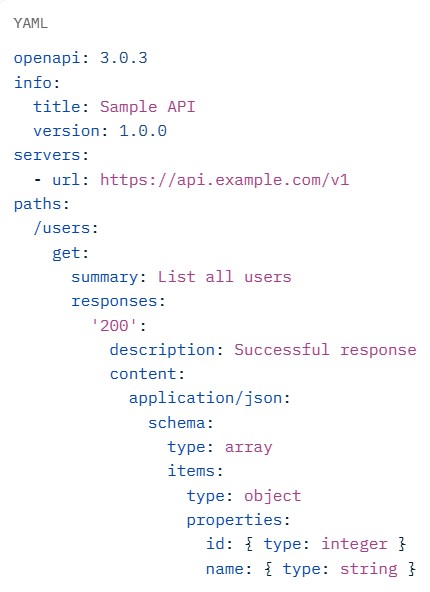
Open API
OpenConfig
In SMPTE ST 2110 / NMOS environments (IP-based video/audio production):
OpenTelemetry
It formed from the merger of two earlier projects:
OpenTelemetry combines the best of both, adds logs support, and aims for a single, portable standard to avoid vendor lock-in.
PTP Monitoring (gNMI/JSON, Prometheus/Grafana)
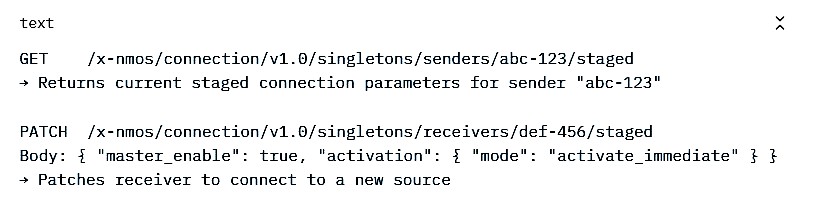
Rest APIs
Example: /users/123, /devices/node-abc, /sources/sdp-456.
Example response:
JSON{
"id": "node-abc",
"label": "Camera 1",
"enabled": true
}
Role-Based Access Control
RBAC works by:
NMOS controllers (software or panels that query registries, manage connections, route streams) interact with protected APIs via IS-10 Authorization (OAuth 2.0 + JWTs).
SDP (Session Description Protocol)
text
v=0
o=- 1234567890 2 IN IP4 192.168.1.100
s=Video Flow
c=IN IP4 239.1.2.3/32
t=0 0
m=video 5004 RTP/AVP 96
a=rtpmap:96 raw/90000
a=fmtp:96 sampling=YCbCr-4:2:2; width=1920; height=1080; exactframerate=60000/1001; ...
SNMPv3
SNMPv3 introduces a full security model with three main aspects:
Level
Authentication
Privacy (Encryption)
Typical Use Case
noAuthNoPriv
No
No
Testing or trusted internal networks (insecure)
authNoPriv
Yes
No
Integrity and authentication required, but encryption not necessary
authPriv
Yes
Yes
Full security (recommended for production)
SNMPv3 = SNMP with proper security — authentication, optional encryption, and fine-grained access control.
SSH (Secure Shell)
It enables encrypted communication for:
Syslog
- Timestamp
- Hostname / IP
- Facility (category: e.g., auth, cron, kernel, mail, user)
- Severity (0–7: emergency, alert, critical, error, warning, notice, info, debug)
- Structured data (optional key-value pairs)
- Message content
text<34>1 2026-02-18T19:29:45Z encoder1.example.com app - - - [timeQuality tzKnown="1"] SSH login failed for user admin from 192.168.1.50
(Priority 34 = facility 4 [auth] + severity 2 [critical])
- Traditionally UDP port 514 (fast, unreliable — messages can be lost).
- Modern/recommended: TCP port 514 or TLS-encrypted TCP port 6514 (reliable, secure).
- Some implementations use RELP (Reliable Event Logging Protocol) over TCP.
Common Use Cases in Broadcast/Media IP Networks
- Central logging of:
- NMOS node registration failures or API errors.
- PTP grandmaster changes or sync offsets (critical for ST 2110 timing).
- Switch/router events (port flaps, IGMP joins/leaves for multicast).
- Encoder/playout server alarms, stream drops, or bitrate issues.
- Security events (failed SSH logins, 802.1X auth failures).
- Integration with SIEM tools (Splunk, ELK Stack/Elastic, Graylog, QRadar) for alerting, correlation, and compliance.
Popular Syslog Implementations
- rsyslog (Linux default on most modern distros — very feature-rich).
- syslog-ng (powerful filtering, parsing, and reliability features).
- nxlog (cross-platform, good for Windows + Linux).
- Cloud collectors: AWS CloudWatch Logs, Google Cloud Logging, Azure Monitor.
Security Best Practices
- Always use TLS (syslog over TLS) for sensitive logs — plaintext UDP/TCP exposes credentials, IPs, and details. Restrict source IPs via firewall rules. Use authentication where possible (client certificates in some setups). Rotate and archive logs; set retention policies.
In short: Syslog is the universal "logging glue" of networks — devices send structured log messages to a central server so you can monitor, debug, and secure everything from one place. In media facilities, it's invaluable for tracing timing issues, stream failures, or security incidents across distributed IP infrastructure.
TLS/mTLS for APIs
TLS (Transport Layer Security) and mTLS (Mutual TLS) are cryptographic protocols that secure communication over networks, especially for APIs. They ensure data is encrypted in transit, prevent eavesdropping, tampering, and (in varying degrees) impersonation attacks.
What is TLS?
TLS is the successor to SSL and the standard for secure communication today (e.g., HTTPS). It provides:
- Encryption — Data is scrambled so only the intended parties can read it.
- Integrity — Messages can't be altered undetected (via MACs or AEAD).
- Server authentication — The client verifies the server's identity using an X.509 certificate.
In a typical API call:
- Client connects to https://api.example.com.
- Server presents its certificate (signed by a trusted CA like Let's Encrypt, DigiCert).
- Client checks the certificate (valid, not expired, matches domain, trusted chain).
- They negotiate keys and establish an encrypted channel.
- Only the server is proven authentic; the client is usually anonymous or authenticated later (e.g., via JWT in Authorization header, API key, OAuth token).
Use cases for standard TLS:
- Public APIs (e.g., weather, payment gateways). Web browsing, mobile apps calling backends. Any client-server where you trust the server but don't need to pre-verify every client.
This is the default for almost all APIs today.
What is mTLS (Mutual TLS)?
mTLS extends TLS by requiring mutual authentication: both the client and the server present and verify X.509 certificates during the TLS handshake. This happens before any application data (like HTTP requests) is sent.
Key differences:
- In TLS: Only server certificate is presented and verified.
- In mTLS: Server verifies the client's certificate (and vice versa), creating two-way trust at the transport layer.
How the mTLS handshake works (simplified):
- Client initiates connection.
- Server sends its certificate → client verifies it (standard TLS step).
- Server requests client certificate ("Client Certificate Request").
- Client sends its own certificate (and proves possession of private key).
- Server verifies client's certificate against a trusted CA or trust store.
- Both sides confirm the other is trusted → encrypted channel established.
- Only then does the HTTP request proceed (e.g., GET /protected-resource).
If either certificate is invalid, missing, revoked, or untrusted → connection fails immediately (no chance for app-layer auth).
Why Use mTLS for APIs?
- Strong client identity — No shared secrets, API keys, or tokens that can leak; identity is tied to a cryptographic key pair.
- Zero-trust friendly — Verifies "who" is calling the API at the network edge, before any code runs.
- Prevents unauthorized access — Even if someone has a valid JWT or API key, without the right certificate → no connection.
- API-to-API / machine-to-machine — Ideal for microservices, service meshes (e.g., Istio, Linkerd), B2B integrations, internal backends.
- Defense in depth — Works alongside JWT/OAuth for layered security.
- Regulatory/compliance — Common in finance (e.g., Mastercard APIs), healthcare, government, broadcast/media facilities with sensitive IP streams.
In broadcast/media contexts (like NMOS/ST 2110 environments), mTLS can secure control-plane APIs between nodes, controllers, and registries, ensuring only trusted devices participate.
TLS vs mTLS: Quick Comparison
| Aspect | TLS (One-way) | mTLS (Mutual / Two-way) |
|---|---|---|
| Authentication | Server only | Both server and client |
| Certificate Required | Server: yes; Client: no | Both server and client |
| Client Identity | Application layer (JWT, API key, etc.) | Transport layer (certificate) |
| Security Level | Good for public-facing services | Excellent for internal / zero-trust APIs |
| Management Overhead | Low (server certificate only) | Higher (issue, manage, rotate client certificates) |
| Revocation Checking | Server certificate CRL / OCSP | Both sides (more complex) |
| Typical Use | Websites, public APIs | Microservices, B2B, secure IoT, enterprise APIs |
| Performance Impact | Minimal | Slightly higher (additional handshake steps) |
Practical Notes (2026 Context)
- Certificate management is the biggest challenge for mTLS: You need a PKI (private CA or managed service like AWS ACM PCA, HashiCorp Vault, Smallstep).
- Public CAs are phasing out client auth support in dual-EKU certs (Chrome policy ~2026), so internal/private CAs are standard for mTLS.
- Many platforms support it natively: AWS API Gateway/CloudFront, Azure, Google Cloud, NGINX, Envoy, Istio.
- Often combined with JWT: mTLS authenticates the client machine → JWT authorizes the user/action.
In short:
- Use TLS for most public/consumer APIs.
- Use mTLS when you need ironclad proof of client identity, especially in trusted or high-security environments like media production networks or zero-trust setups.
Configuring base IP/VLANs
VLANs segment a network at Layer 2 (broadcast domains), while IP addresses operate at Layer 3. To make VLANs useful with IP traffic:
- Devices in the same VLAN can communicate directly (same broadcast domain).
- Devices in different VLANs need Layer 3 routing (via a router or Layer 3 switch).
- Each VLAN is typically paired with its own IP subnet (e.g., VLAN 10 → 192.168.10.0/24).
- 1. Basic VLAN + IP on a Layer 2 Switch (management IP only)
Layer 2 switches don't route between VLANs, but you assign an IP for management (e.g., SSH/Web access).
Typical steps (Cisco IOS example):- Create VLAN(s): vlan 10 → name Office
- Assign switch ports to VLANs:
- Access port: interface GigabitEthernet1/0/5 → switchport mode access → switchport access vlan 10
- Assign IP to the switch (usually on VLAN 1 for management):
interface vlan 1ip address 192.168.1.10 255.255.255.0no shutdown - Set default gateway: ip default-gateway 192.168.1.1
2. Assigning IP to a VLAN (Layer 3 capability)
To give devices in a VLAN a default gateway, configure a Switched Virtual Interface (SVI) or VLAN interface with an IP. This is done on:
Layer 3 switches (e.g., Cisco Catalyst with IP Services, many modern "smart" switches).
Routers (via subinterfaces or bridge VLANs).
Cisco Layer 3 Switch example (common enterprise method)
- Think of YANG as a schema or blueprint — it defines what data looks like (e.g., an interface has a name, IP address, MTU; a BGP neighbor has an IP and AS number) and rules (e.g., MTU must be 1500–9216, IP must be valid IPv4/IPv6).
- It organizes data in a tree-like structure (containers group related items, lists allow multiples, leaves hold values).
- YANG is human-readable (C-like syntax) and machine-processable.
- It's protocol-agnostic — used with NETCONF (XML-based), RESTCONF (HTTP/REST-like), gNMI (gRPC-based), etc.
- Widely adopted for vendor-neutral modeling (OpenConfig) and vendor-specific models (Cisco, Juniper, Arista).
- YANG models define the rules → tools/libraries generate or validate JSON payloads that conform to those rules.
- JSON is used for:
- RESTCONF payloads (preferred over XML in many modern APIs).
- gNMI telemetry streaming.
- OpenAPI docs (when describing YANG-modeled APIs).
- RFC 7951 specifically defines how to encode YANG-modeled data as JSON (e.g., hierarchical trees become nested objects, lists become arrays, leaf values map directly).
- Define models in YANG → compile/validate tools generate code or docs. To configure/query: Create JSON (or XML) data that matches the YANG structure → send via RESTCONF (HTTP POST/PUT/GET) or NETCONF. Device validates incoming JSON against its loaded YANG models → applies config or returns state in JSON. In broadcast/media setups: OpenConfig YANG models help standardize switch configs for multicast, QoS, PTP interfaces → JSON payloads make automation scripts (Python, Ansible) vendor-agnostic.
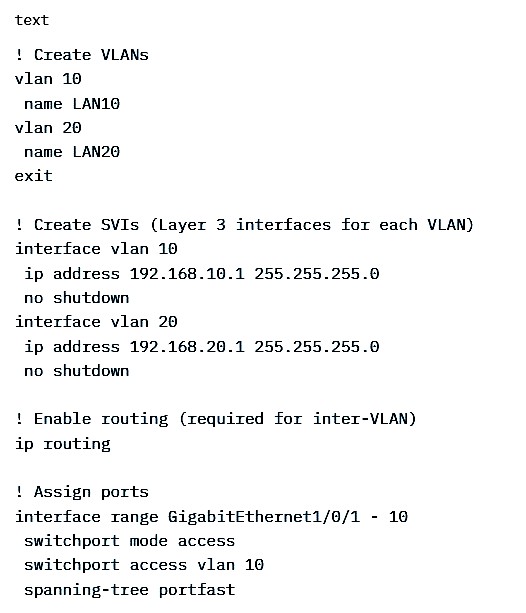 Devices in VLAN 10 use 192.168.10.1 as gateway; same for VLAN 20.
MikroTik RouterOS example (very common for prosumer routers)
Devices in VLAN 10 use 192.168.10.1 as gateway; same for VLAN 20.
MikroTik RouterOS example (very common for prosumer routers)
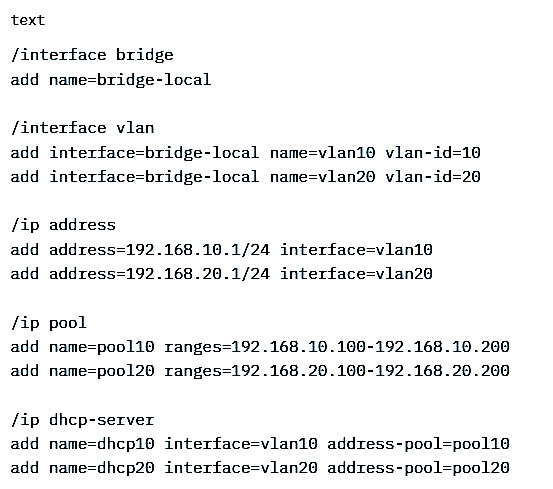 3. Inter-VLAN Routing Options (quick summary)
Router-on-a-Stick (single router link to switch): Trunk port on switch → subinterfaces on router (e.g., GigabitEthernet0/0.10 encapsulation dot1Q 10 → ip address 192.168.10.1/24).
Layer 3 Switch (SVIs + ip routing enabled): Most efficient for many VLANs.
Separate physical links: One router port per VLAN (less common now).
Quick Tips
VLAN 1 is usually default/management—avoid using it for user data if possible.
Trunk ports carry multiple VLANs (tagged): switchport mode trunk + switchport trunk allowed vlan 10,20.
Always test connectivity: ping gateway from a host, then across VLANs.
For home/prosumer gear (Ubiquiti, TP-Link managed, Netgear smart switches), use the web GUI: create VLAN → assign ports → set VLAN interface IP → enable DHCP per VLAN.
This is the foundational setup—start small (one extra VLAN), verify with ping/traceroute, then expand. Let me know your specific hardware (Cisco, MikroTik, Ubiquiti, etc.) for more tailored commands!
3. Inter-VLAN Routing Options (quick summary)
Router-on-a-Stick (single router link to switch): Trunk port on switch → subinterfaces on router (e.g., GigabitEthernet0/0.10 encapsulation dot1Q 10 → ip address 192.168.10.1/24).
Layer 3 Switch (SVIs + ip routing enabled): Most efficient for many VLANs.
Separate physical links: One router port per VLAN (less common now).
Quick Tips
VLAN 1 is usually default/management—avoid using it for user data if possible.
Trunk ports carry multiple VLANs (tagged): switchport mode trunk + switchport trunk allowed vlan 10,20.
Always test connectivity: ping gateway from a host, then across VLANs.
For home/prosumer gear (Ubiquiti, TP-Link managed, Netgear smart switches), use the web GUI: create VLAN → assign ports → set VLAN interface IP → enable DHCP per VLAN.
This is the foundational setup—start small (one extra VLAN), verify with ping/traceroute, then expand. Let me know your specific hardware (Cisco, MikroTik, Ubiquiti, etc.) for more tailored commands!
YANG/JSON
YANG and JSON are related but serve different purposes in modern network management, especially for programmable networks (e.g., automation in broadcast/media IP infrastructures like ST 2110 switches/routers).
YANG (Yet Another Next Generation) is a data modeling language defined in RFC 7950 (YANG 1.1). It describes the structure, types, constraints, and hierarchy of configuration and operational (state) data for network devices.Example snippet of a simple YANG module:
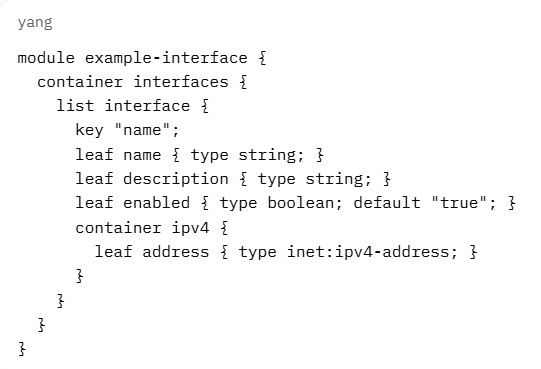
This defines the allowed structure for interface config/state.
What is JSON in this context?
JSON (JavaScript Object Notation) is a lightweight data interchange format (RFC 8259) — it's how actual data (instances) is encoded and sent/received over the wire.
Example JSON instance conforming to the YANG above:
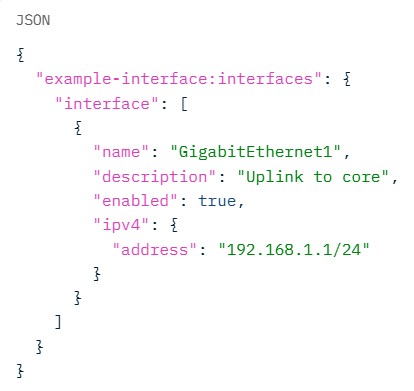
YANG vs. JSON: Key Differences
| Aspect | YANG | JSON |
|---|---|---|
| Purpose | Data modeling (schema / blueprint) | Data serialization (actual payload format) |
| What It Is | Language to define structure and constraints | Lightweight text format for data exchange |
| Sent Over Network? | No (models are loaded once) | Yes (configuration payloads, telemetry data) |
| Human-Readable? | Yes (more verbose than JSON) | Very (simple key-value / object structure) |
| Used With | NETCONF, RESTCONF, gNMI, OpenConfig | RESTCONF (preferred), gNMI, APIs |
| Example Role | "This interface must have a valid IP" | { "address": "10.0.0.1" } |
How They Work Together
In short:
YANG = the contract/schema for network data.
JSON = the envelope that carries the actual data based on that contract.
This combo powers much of modern network programmability — far more reliable than parsing CLI output.
