 Study Plan
2110 Topo
Study Plan
2110 Topo
This lesson explains Firewalls and how it fits into the SMPTE ST 2110 stack.
• Firewall States
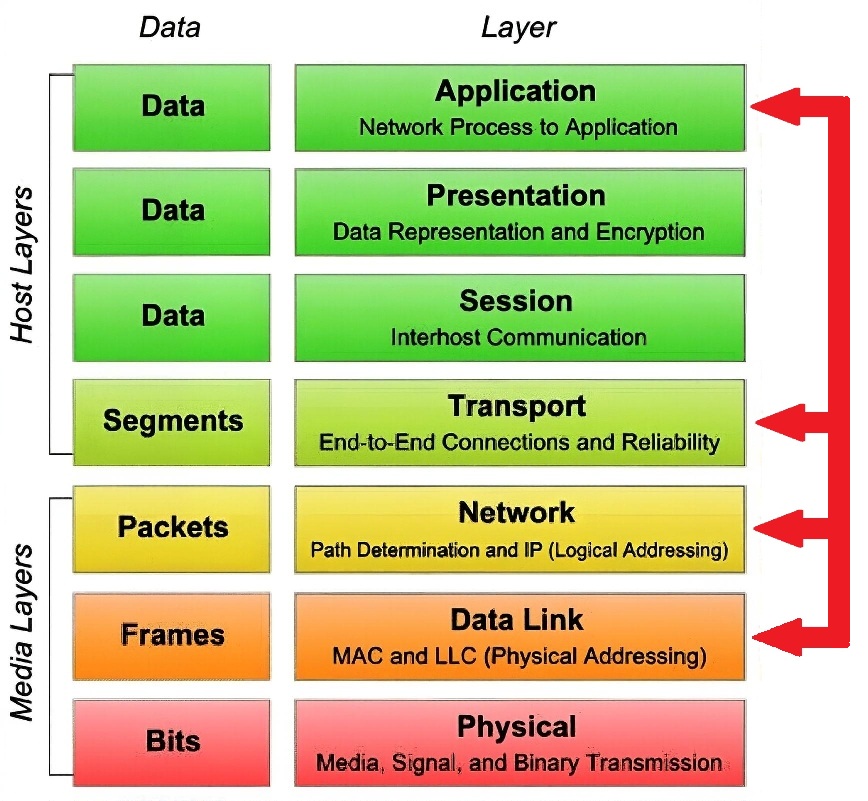
• Firewall Involvement at the various layers
• DMZs
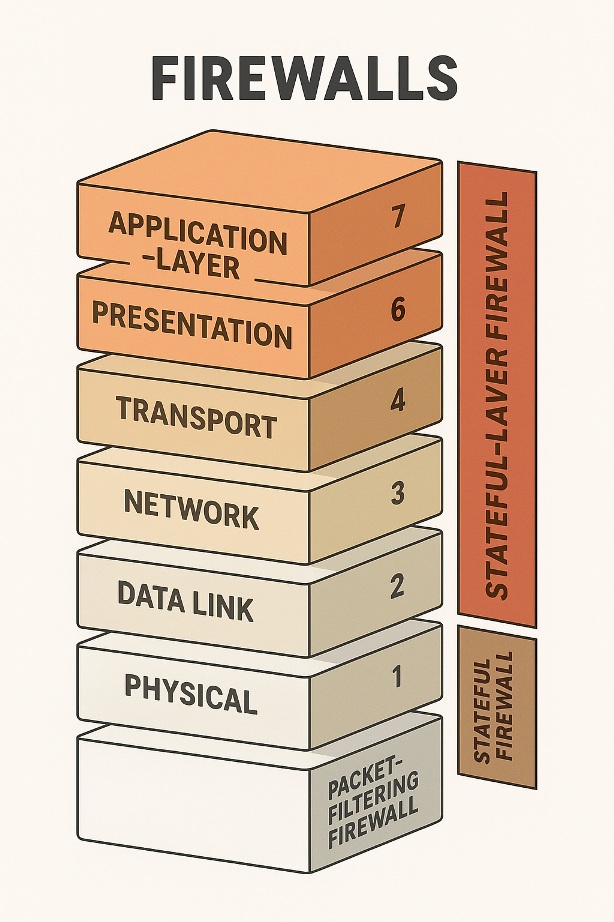
Where firewall preside one that often confuses people because firewalls aren’t confined to just one OSI layer. They span several layers depending on their sophistication and function. There are no pure Session- or Presentation-layer firewalls; modern firewalls enforce Layer-5/6 concepts only as part of Layer-7 application-aware security systems.
We will introduce them now, as starting tomorrow we will start to transition into layers that are more 2110 specific.
The hardware part is usually a router, but it can be a computer or dedicated piece of hardware (a black box) with 2 NIC cards in it. Modern firewalls are rarely “just a router with two NICs.” Most enterprise and mid-market firewalls today are purpose-built appliances (Palo Alto, Fortinet, Check Point, Cisco Firepower/ASA, etc.) with specialized ASICs/NPUs, multiple high-speed ports, and often integrated switching/routing. The “two-NIC Linux box running iptables” model is now mostly a hobbyist / very small office thing.
Firewalls can stand between the inside network and the outside internet, between the local network and a resource, such as a server, or simply between different network segments.
 Firewalls maintain Access Control Lists (
ACL
). These filter traffic based on source and destination IP addresses, protocols in use, source and destination port numbers, and packet type.
Firewalls maintain Access Control Lists (
ACL
). These filter traffic based on source and destination IP addresses, protocols in use, source and destination port numbers, and packet type.
Stateful Firewall keeps track of connections/sessions via TCP’s 3-way handshake. These firewalls tend to be a bit slower at establishing connections, but after a connection is established, they are usually faster because they just have to check the session state table for the connection instead of comparing the packet against all the relevant ACLs. While this was true in the late 1990s–early 2000s. Today’s stateful firewalls (especially
NGFWs
A Next-Generation Firewall goes beyond traditional port- and IP-based filtering by understanding applications and users, not just packets. It operates primarily at OSI Layers 3–7, inspecting traffic deeply to make security decisions.
Core NGFW capabilities
Traditional Firewall
NGFW
Filters by IP, port, protocol
Filters by application, user, and content
Layer 3/4 focus
Layer 3–7 inspection
Limited payload visibility
Deep Packet Inspection (DPI)
Basic ACL rules
Application-aware policies
Separate IDS/IPS devices
Integrated IDS/IPS
• Stateful inspection (tracks session state)
• Deep Packet Inspection (DPI)
• Application identification (e.g., “Zoom,” “YouTube,” “SFTP” even if on port 443)
• Integrated IDS/IPS (intrusion detection/prevention)
• TLS/SSL inspection (optional, with certificates)
• User- and group-based policies
• Advanced threat protection (malware, command-and-control detection)
with hardware acceleration) establish connections as fast as or faster than stateless ones because the session lookup is done in hardware tables (
CAM/TCAM
) or very efficient hash tables. The “slower establishment” stereotype is largely obsolete on current hardware.
Stateless Firewall only looks at individual packets and applies them to an ACL. It doesn't care about the context the packets are in. It’s simpler and requires less memory. These are best used on an internal network where there are fewer security threats.
Many firewalls will use
Dynamic Packet Switching
Dynamic Packet Switching is not a widely standardized or commonly used term in modern networking literature. It appears occasionally in older academic papers, patents, or specific contexts (e.g., early satellite broadcast systems or experimental designs from the 1970s–1990s) to describe packet switching with dynamic elements, such as:
• Adaptive or on-demand resource allocation (e.g., dynamic bandwidth sharing or routing decisions based on real-time conditions).
•Variable packet paths and statistical multiplexing in networks without fixed circuits.
In essence, it refers to the core principle of packet switching itself — breaking data into packets that are routed dynamically (independently, often taking different paths) across the network, as opposed to circuit switching (fixed dedicated path).
Today, this is simply called packet switching (the foundation of the Internet, Ethernet, IP networks, etc.), with "dynamic" emphasizing features like dynamic routing, dynamic bandwidth allocation, or connectionless/datagram operation.
If the term was used in a specific context (e.g., firewall stateful inspection or a particular vendor/tool), it might have been a non-standard or outdated way to describe stateful packet inspection or dynamic filtering — but no mainstream firewall documentation uses "Dynamic Packet Switching" for that purpose. The standard term there is stateful inspection or stateful firewalling.
, which ensures that packets they forward match sessions initiated on their private side by something called a dynamic state list or state table, which keeps track of all communication sessions between stations from inside and outside the firewall.
Attachments — all .exe files are blocked; content encoding; email headers; language phrases; proximity of words to each other; URLs, and finally Bayesian — or the probability that some combination of the above might spell trouble.
Many firewalls are implemented at the Application level because they are more aware of data use. They not only know the network and transport layer contexts but also the application context such as FTP, SNMP, HTTP, etc. A drawback is that these firewalls are slightly slower. Application firewalls can scan actual payloads for malware and other content.
How Application firewalls work
Here’s how to think about it:
| OSI Layer | Name | Firewall Involvement | Explanation / Examples |
|---|---|---|---|
| Layer 1 | Physical (Bits) | ❌ None | Cables, optics, electrical signals—no firewall function here. |
| Layer 2 | Data Link (Frames) | ⚙️ MAC filtering / switch ACLs | Block by MAC; e.g., Port Security, wireless MAC filters. |
| Layer 3 | Network (IP) | ✅ Packet filters | Allow/deny by src/dst IP, protocol (TCP/UDP/ICMP), TTL. (Cisco ACL, iptables) |
| Layer 4 | Transport (TCP/UDP) | ✅ Stateful firewalls | Track connection state (handshakes, flows). Example: ASA, pfSense, Palo Alto. |
| Layer 5 | Session | ⚙️ Session-aware | Understands SIP/H.323; opens pinholes for related RTP streams. |
| Layer 6 | Presentation | ⚙️ TLS/SSL inspection | Decrypt/inspect encrypted traffic (policy-dependent). |
| Layer 7 | Application | ✅ NGFW / DPI | Deep Packet Inspection of HTTP, DNS, RTSP, RTP, etc.; content policies, IPS. |
| Type | OSI Layers | Example Functions |
|---|---|---|
| Packet-Filtering Firewall | L3 | Permit/deny by IP, protocol, and port; stateless. |
| Stateful Inspection Firewall | L3–L4 | Tracks session/state (TCP handshakes, UDP flows); dynamic rules. |
| Application-Layer (Proxy) Firewall | L7 | Understands application protocols; URL filtering, protocol validation. |
| Next-Generation Firewall (NGFW) | L3–L7 | Combines stateful + DPI + IDS/IPS, AV, TLS inspection, user-aware policies. |
A host based firewall is installed on a host and only protects that machine; this software based firewall isn't usually as robust as a dedicated firewall.
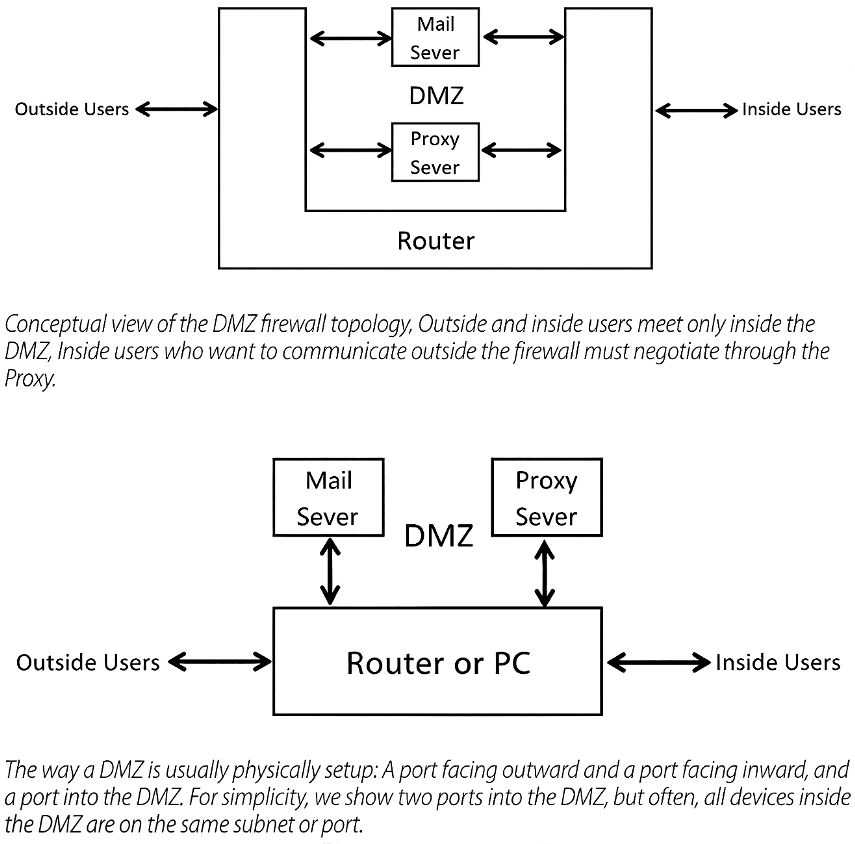
When a network has resources that must be accessed from the outside, a DMZ zone is usually setup. This is done either with a single computer or router or with two machines. The purpose is to allow outside users, along with inside users, access to resources such as email, ftp, web, DNS servers, and often a proxy server, but still keep outside users out of the internal network.
In the single firewall approach, there are three NIC cards, one outward facing, one inward facing, and one port to the resources between the inside and outside networks. Traffic from the outside is only allowed to the resources in the DMZ. Traffic from the inside is also routed only to DMZ resources. Any web traffic generated from inside must go through the proxy server in the DMZ. Any traffic with malicious intent must get through these DMZ servers. If designed and maintained correctly, that should not happen. The bad guys may cause havoc in the DMZ but shouldn’t be able to get to the inside.
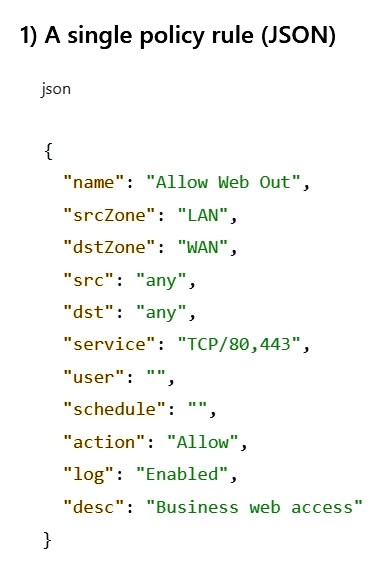
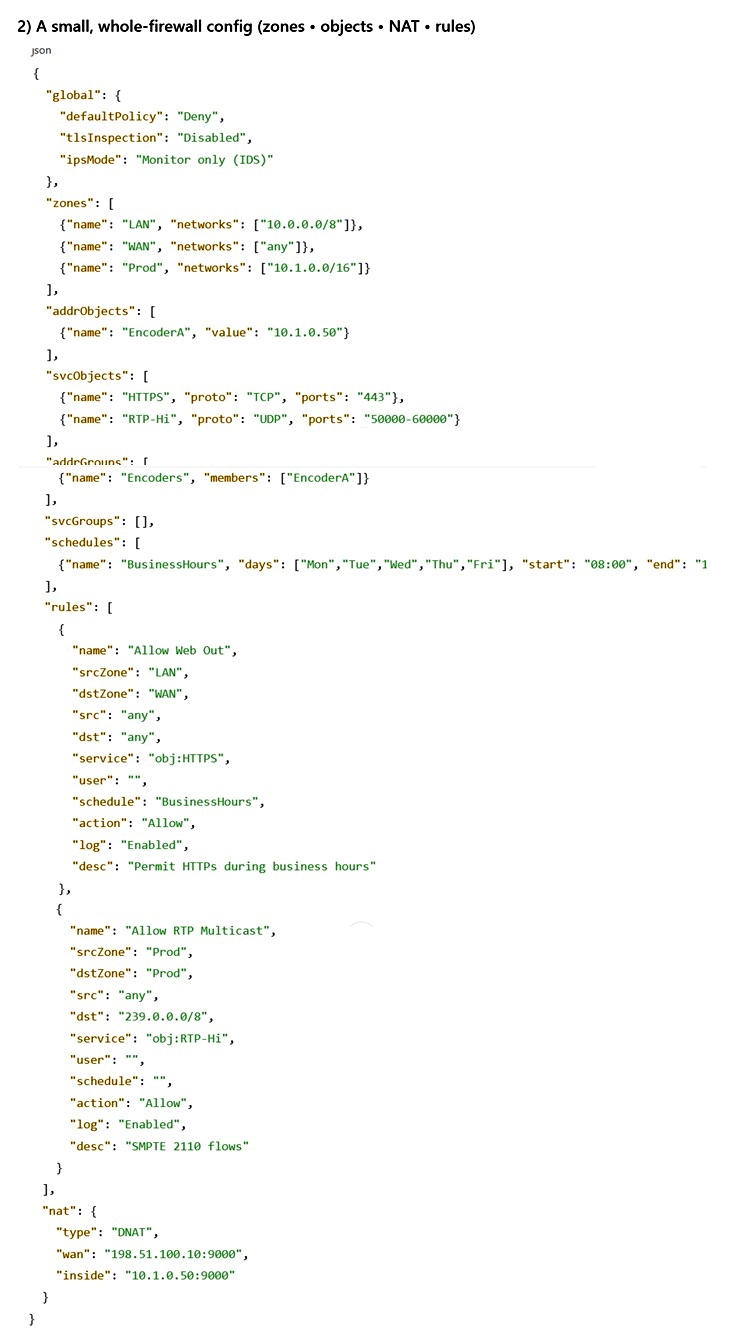
Many modern systems—including switches, routers, and firewalls—use JSON files for configuration, automation, and data exchange. JSON (JavaScript Object Notation) is a lightweight, plain-text format for structured data. It consists of just a few basic building blocks:
JSON is human-readable, easy for programs to parse, and supported by virtually every programming language and networking tool.
How Firewalls Use JSON
Why JSON Is Especially Handy for Firewalls
Gotchas & Best Practices
A couple examples