
 Study Plan
2110 Topo
Study Plan
2110 Topo
This lesson explains Multicastings and how it fits into the SMPTE ST 2110 stack.
• Why Multicast
• Joining and Leaving Streams
The Problem: One-to-Many Distribution with Unicast
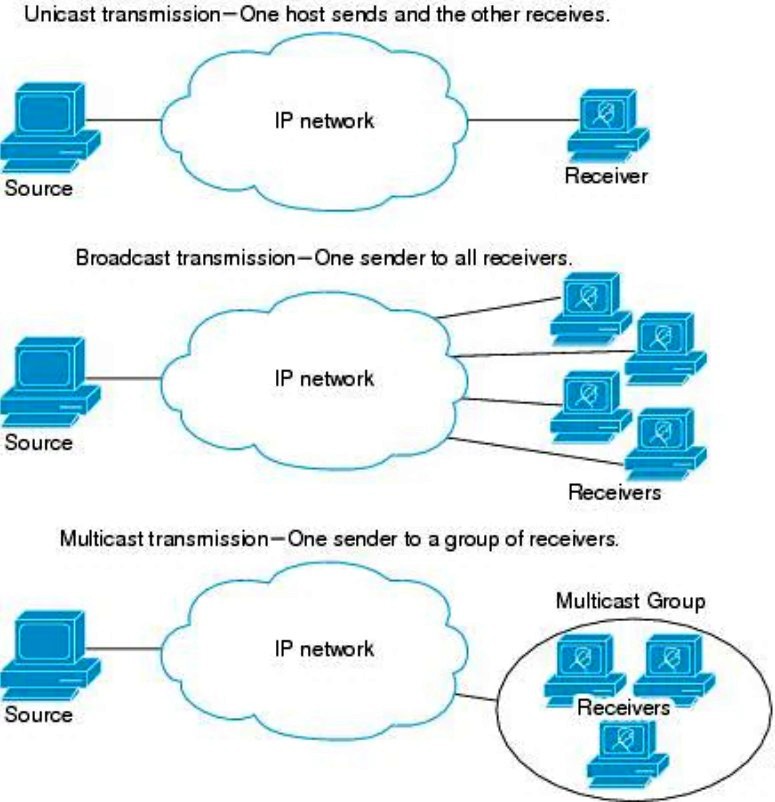
In unicast, each receiver requires its own separate connection.
If a sender (for example, a live video encoder) needs to deliver the same stream to 100 receivers, it must transmit 100 identical copies of the packets.
This consumes:
While unicast is ideal for one-to-one communication (web browsing, file transfers), it scales poorly for real-time media distribution to many receivers.
 The Multicast Solution: One Stream, Many Subscribers
With IP multicast, the sender transmits a single stream to a special multicast group address (for example, 239.0.0.1). Receivers that want the stream subscribe to that group using IGMP (for IPv4). The network — switches and routers — replicates packets only where paths diverge, delivering the stream efficiently to all subscribers.
So, the flow looks like this:
Sender → (one stream) → Router → Switch → Multiple Receivers
or
Sender → (one stream) → Network → Replication at branch points → Multiple receivers
Each link carries only one copy of the stream, until replication is required, no matter how many receivers exist downstream.
Step-by-Step
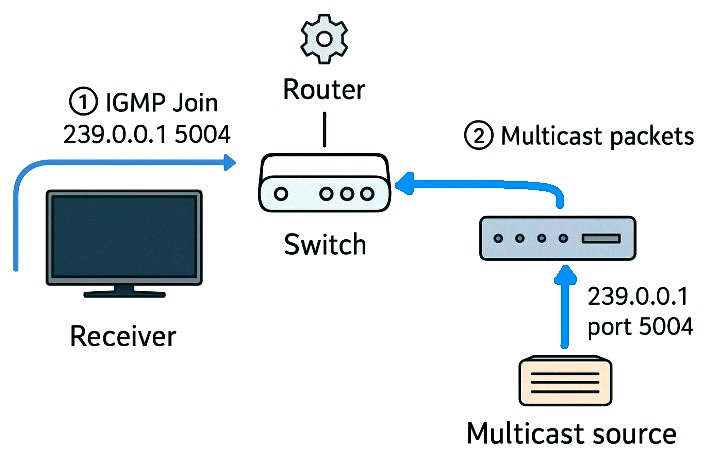
In flat 2110 networks, switches do most of the visible work — but routers still matter at VLAN/L3 boundaries.
Efficiency Comparison
| Method | Copies Sent by Source | Network Load | Ideal For |
|---|---|---|---|
| Unicast | 1 per receiver | Scales linearly (bad) | One-to-one traffic |
| Broadcast | 1 to everyone | Floods entire LAN (wasteful) | Local discovery, ARP |
| Multicast | 1 per group | Replicated only where needed | One-to-many (video, audio, telemetry) |
Examples
Multicast enables one-to-many streaming by:
Example 1 – PC or Server (Linux/Windows CLI)
You can join a multicast group and receive packets using command-line tools:
Linux
Windows PowerShell
# Windows joins automatically when an app opens a multicast socket.
# Example: using VLC: vlc udp://@239.0.0.1:5004
Opening that address in VLC causes Windows to issue an IGMPv3 Membership Report (Join).
Example 2 – Set-Top Box or IPTV Receiver
A set-top box is usually pre-configured to tune into multicast channels:
# IPTV channel list (M3U format)
#EXTINF:-1, Channel 1
udp://@239.0.0.1:5004
#EXTINF:-1, Channel 2
udp://@239.0.0.2:5004
When the user selects “Channel 1,” the box sends:
IGMP Join → 239.0.0.1
When the user changes the channel, it sends:
IGMP Leave → 239.0.0.1
IGMP Join → 239.0.0.2
Example 3 – Python Program
You can join a multicast group directly from a script:
import socket, struct
mcast_grp = '239.0.0.1'
mcast_port = 5004
sock = socket.socket(socket.AF_INET, socket.SOCK_DGRAM, socket.IPPROTO_UDP)
sock.setsockopt(socket.SOL_SOCKET, socket.SO_REUSEADDR, 1)
sock.bind(('', mcast_port))
mreq = struct.pack("4sl", socket.inet_aton(mcast_grp), socket.INADDR_ANY)
sock.setsockopt(socket.IPPROTO_IP, socket.IP_ADD_MEMBERSHIP, mreq)
print(f"Joined multicast group {mcast_grp}:{mcast_port}")
while True:
data, addr = sock.recvfrom(10240)
print(f"Received {len(data)} bytes from {addr}")
Running this script automatically sends the IGMP Join, and the network begins forwarding multicast traffic to that port.
Summary
| Device Type | How it Subscribes | Example Address |
|---|---|---|
| Set-Top Box | Automatically joins via firmware/app when channel is selected | udp://@239.0.0.1:5004 |
| PC (VLC) | Joins when opening a multicast URL in a player | udp://@239.0.0.1:5004 |
| Script / App | Uses socket API with IP_ADD_MEMBERSHIP to join group |
239.0.0.1 (UDP port e.g., 5004) |
| Switch / Router | Learns membership from IGMP Join messages; controls forwarding | N/A |
