 Study Plan
2110 Topo
Study Plan
2110 Topo
This lesson explains Routing and how it fits into the SMPTE ST 2110 stack.
• Physical Segmentation
• EGP
• BPG
• Interior Routing Protocols (Inside Autonomous Systems)
• IGP
• RIP
• DV
• IGRP
• EIGP
• LS
• OSPF
• Router Setup
We've looked at switches here, and VLANs here. Now we will look at Routing.
Sample interactive router setup GUI
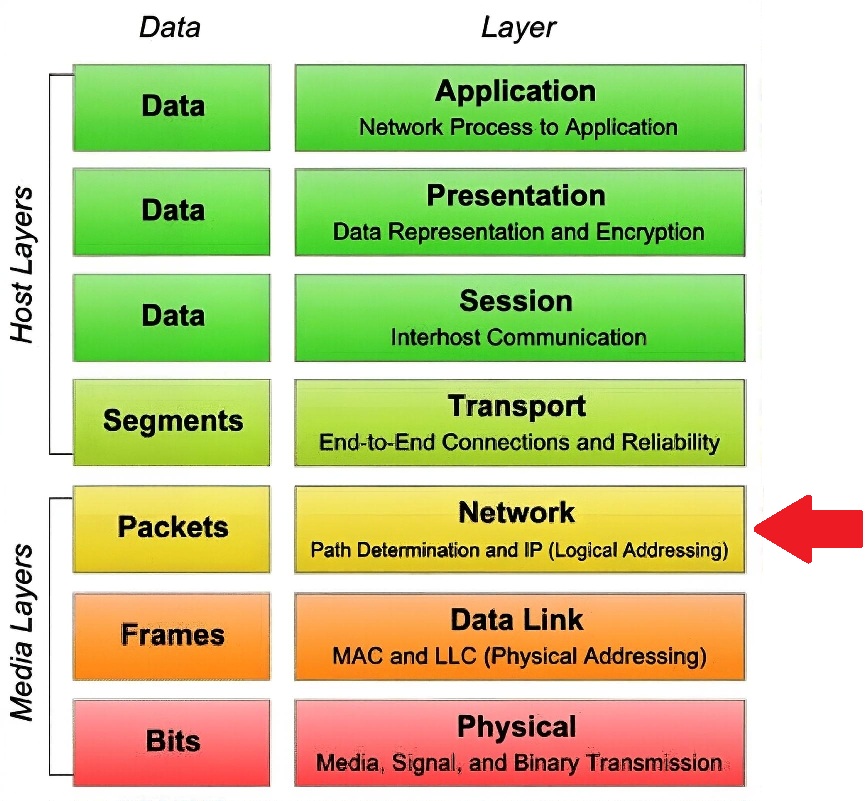
Routers were usually something that was out of the truck engineer’s scope of work. But the engineer absolutely must be aware of their general use, and how they affect the larger network topology that often will surround a single truck. In addition, there are IT folks who have extensive training in dealing with these devices, and the engineer at least needs to know some of the acronyms and terminology used. Just as there is a large industry, training and certifying IT professionals, a very large subset of that is mastering the subtleties of router control and management. When an IT professional talks about network policy, the bulk of that is enacted at the router/network layer, while some part of it might occur at the switch/data-link layer and layers above the network layer.
 Routers are used to provide physical segmentation between subnets. They also provide connectivity to VLANs on different subnet LANs. While routers won’t pass ARP requests, they need to initiate them. Each port on a router is usually connected to separate subnet. For a host to reach separate subnets, they need to pass through a router. Routers can also be set up to discriminate against traffic based on IP addresses, port addresses, which port the traffic is arriving on or leaving to, and other parameters.
While we haven’t talked specifically about ports yet, as that is a layer 4 or Transport concept, routers, considered layer 3/Network devices, also work on the next layer up.
Routers will pass DHCP requests if set up to do so. If a host transmits 255.255.255.255 (layer 3) and FF:FF:FF:FF:FF:FF (layer 2) and if the DHCP server is not on the same LAN segment a router will see the address as a broadcast. The router will look at the port number set on the transport layer (for DHCP port 63) and know that this is a DHCP/BootP request, and will unicast the request out the proper router port to the DHCP server on the proper LAN segment.
Many types of hardware can be used as DHCP servers, which include routers. That means there wouldn’t need to be a separate DHCP server. Remember, if all you have is a wireless WAP/router that is most likely acting as your DHCP, while also performing DNS and NAT duties.
Another important aspect about Routers is that they can provide Quality of Service (QoS) levels for specific types of traffic.
There are a number of philosophies as to how routers are organized and work. We will briefly look at the main ones.
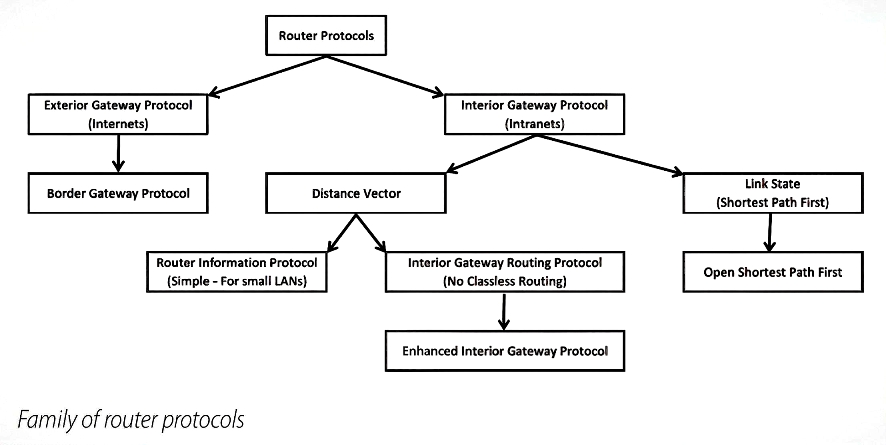
There are two basic overriding router philosophies. The first is Exterior Gateway Protocol (EGP), which works outside or between one or more Autonomous Systems (AS). An AS could be the NOCs LAN/WAN or all the trucks and equipment that make up the Super Bowl. There is only one EGP approach, which is Border Gateway Protocol (BGP).
In Summary:
Strengths:
Weaknesses:
BGP is used by many ISPs or by really large corporations. Small to medium networks do not use this protocol. BGP allows multiple paths to ISPs, and is used to connect multiple AS together. AS simply means a network or set of networks that are under the same administration entity. The AT&T network, MIT, your ISP are AS. Inside your truck, or compound is an AS. This protocol uses classless routing.
As we saw earlier, Classless routing protocols extend the standard Class A, B, or C addressing scheme (/8, /16, /24) by using a subnet mask or mask length to indicate how routers must interpret an IP network ID. Classless routing protocols include the subnet mask along with the IP address when advertising routing information. Subnet masks representing the network ID are not restricted to those defined by the address classes, but can contain a variable number of high order bits. Such subnet mask flexibility enables you to group several networks as a single entity in a routing table, significantly reducing routing overhead.
The BGP is the core routing protocol of the Internet. It maintains a table of IP networks or 'prefixes' which designate network reachability among various AS. It is described as a path vector protocol.
BGP is considered a Distance Vector (DV) protocol. DV finds the route with the fewest hops. Vector means the direction to the desired network. BGP makes routing decisions based on path, network policies and/or rule sets. BGP routers share path and other metrics with all nearby BGP routers. These metrics are stored in router tables. When all DV routers have routing table information from nearby routers integrated into their tables, they are considered converged. As high level paths are added or disappear, routing table re-convergence will ripple across various parts of the internet.
In summary:
Strengths:
Weaknesses:
The second basic routing philosophy is called Interior Gateway Protocol (IGP). Whereas EGP was concerned with routing between various AS, IGP is concerned with routing within an AS. IGP routing is what would be in play within a venue compound if routers are in use. There are two routing protocols used with IGP. Distance Vector (DV) which we looked at briefly and Link-State (LS).
In summary:
Strengths: Works well for intra-domain routing, quick communication.
Weaknesses: Not scalable to Internet-level routing.
There are three DV routing protocols used by IGP. They are Routing Information Protocol (RIP & RIPv2), and IGRP.
RIP is very common, as it is the simplest to implement. RIP was invented in the late 1970s and early 1980s. It is the oldest of the routing methods. Its basic metric is to use hop counts. This value is usually defaulted at 15. This means that as packet is passed from router to router, each router increases the hop count metric by one. When a router receives a packet that has its hop count at 15 it discards it, thus preventing “loops”. That router sends an update to all other routers in the network that the particular route was unreachable. The router will start an internal timer before it will accept information from other routers that a destination has become reachable, and to try that path in the future.
The drawback in using the hop count metric is that this limits the size of the network that can be implemented using RIP. In addition, RIP didn’t allow for Classless routing, it only understood the traditional Class A, B, and C addresses. Techniques used by RIP to maximize routing efficiency include that as RIP routers advertise available routes among routers, a RIP router remembers where it learned of a new route, and will never advertise that route back to the router that it received the information from. This also stops loops from occurring.
RIP does not respond rapidly to changes; they can flood the network with info as they update. Most routers know how to do RIP, but OSPF is replacing many RIP interior routers. Another aspect of RIP that limits network size is that individual routers update each other, the default is usually every 30 seconds. Network traffic can become large from update traffic as router count is increased. Again, when all DV routers have information from other routers in their tables, they are considered converged.
Originally, each RIP router transmitted full updates every 30 seconds. In early deployments, routing tables were small enough that the traffic was not significant. As networks grew in size, however, it became evident there could be a massive traffic burst every 30 seconds, even if the routers had been initialized at random times. It was thought, as a result of random initialization, the routing updates would spread out in time, but this was not true in practice. It has been shown that without slight randomization of the update timer, the timers synchronized over time and sent their updates at the same time. Modern RIP implementations introduce deliberate variation into the update timer intervals of each router.
There is a newer version of RIP known as RIPv2. This newer version allows classless routing. RIPv2 also allows routers to know if traffic is external (via EGP) or internal (IGP).
In summary:
Strengths:
Interior Gateway Routing Protocol (IGRP), invented by Cisco, overcomes RIP hop count limit. IGRP has a default hop count of 100, but can be set as high as 255. It also adds more metrics to determine the “cost” of any particular route by considering metrics such as a path’s available bandwidth, the transit time, current path traffic, and even packet size. But IGRP also can’t be used in a classless routing situation, as it has no field in its tables for a subnet mask.
In summary:
Strengths:
Weaknesses:
Enhanced Interior Gateway Routing Protocol (EIGRP) is also a Cisco proprietary routing protocol loosely based on their original IGRP. This only works on Cisco routers. EIGRP was developed for enterprise wide routing environments. EIGRP is an advanced distance-vector routing protocol, with optimizations to minimize both the routing instability incurred after topology changes, as well as the use of bandwidth and processing power in the router. Routers that support EIGRP will automatically redistribute route information to IGRP neighbors by converting the 32 bit EIGRP metric to the 24 bit IGRP metric.
In summary:
Strengths:
Weaknesses:
LS (Link State) is a shortest path-first protocol. LS Routers each create 3 separate tables.
The first table lists directly attached neighbors, built using "Hello" packets. A second table determines the topology of the entire network, which is built using Link State Advertisement (LSA) or Link State Packets (LSP), listing every available network or neighbor use. Unlike DV routers, which only know about their neighbors, LS routers know about their neighbors, and tell the whole network about those neighbors.
LS routers then run a series Shortest Path First (SPF) tests and generate a third table, which along with the first two tables form the actual routing table. LS routers know more about the internetwork than any DV protocol.
In summary:
Strengths:
Weaknesses:
Open Shortest Path First (OSPF) is the main LS approach. LS routers continually monitor their neighbors by sending tiny messages, called hellos, and share detailed info, called link state advertisements. This protocol builds a complete map of the network topology — every router knows how all routers are connected (the “state” of every “link”). If a connection is lost or created, the routers share this information with their neighboring routers. OSPF is a dynamic routing protocol for use in IP networks. As an IGP protocol, it also operates within a single AS. OSPF works within a single routing domain or AS (Autonomous Systems). It gathers link state information from available routers and constructs a topology map of the network. OSPF detects changes in the topology, such as link failures, very quickly, and converges on a new loop-free routing structure within seconds. The topology built among OPSF routers determines the routing table presented by the network’s edge router, an Internet Layer above it. OSPF supports classless routing, an unlimited hop count, and OSPF routers converge very quickly. As with all engineering feats it comes with trade-offs; it is more costly and more difficult to troubleshoot when things go wrong.
How it works step by step:Link-State Is efficient because Full Topology Awareness. Every router knows the whole map; no guesswork or reliance on neighbors’ “distance” info (as in RIP). Thus fast convergence. When a link changes, updates are instant and localized; no need for slow periodic broadcasts.
Each router’s full map prevents routing loops during normal operation. Networks can be split into “areas” (e.g., OSPF Areas 0, 1, 2) to contain update traffic and keep LSDBs manageable. LSAs are sent only when a change occurs, not on a schedule.
In summary:
Strengths:
Weaknesses:
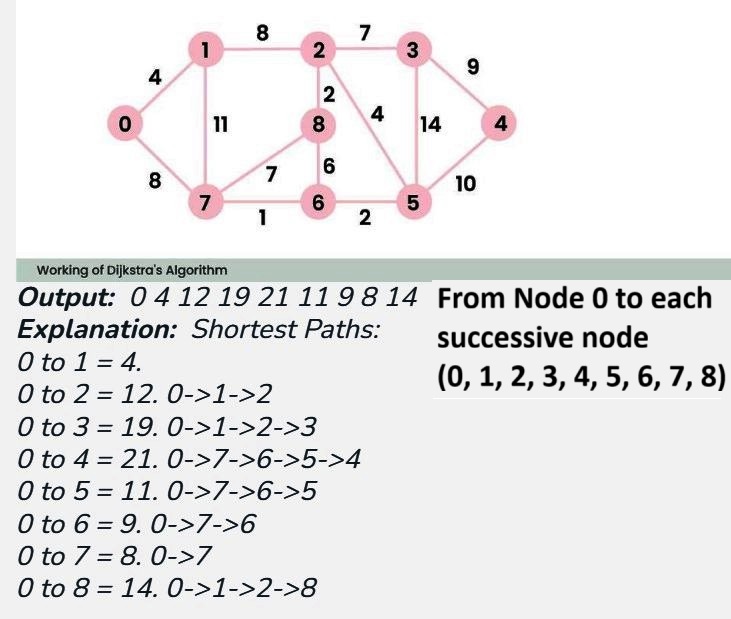
In most SMPTE 2110 production networks, OSPF (Open Shortest Path First) is the most commonly used routing protocol. “Link-state” describes a routing protocol that builds a complete map of the network topology — every router knows how all routers are connected (the “state” of every “link”). Each router then uses that information to independently calculate the best path to every destination using Dijkstra’s Shortest Path First (SPF) algorithm.
Dijkstra's algorithm is a method used to find the shortest path from a starting point (or source node) to all other points in a weighted graph. It works by repeatedly selecting the nearest unvisited node, calculating the distance to its neighbors, and updating their distances accordingly until all nodes are visited.
Most routers found on trucks today will combine many functions into one. While we will look at VPNs later in the application layer, let us say that Virtual Private Networks allow secure communications between separate LANs by creating encrypted “tunnels” through the internet so that you can use the internet like it was a dedicated link between various points. Many routers allow a number of VPNs to be established between it to fixed LANs, such as to the truck vendor’s headquarters and the truck client’s NOC, and also to a number of mobile users, such as those using laptops.
VPNs can be setup between two VPN capable routers (called a Gateway-to-Gateway VPN Tunnel as routers are referred to as Gateways) or between a VPN router and a PC running a VPN client, or that has an OS with a built in IPSec Security Manager or 3rd party VPN application software. IPSec is the security protocol that VPN uses.
Not only are routers layer 3 devices, but they also have layer 2 switch capabilities. While only offering a few switch ports as outputs, they naturally become the root switch for other switches on the truck. These ports are now operating in the gigabit range. The router allows setup of VLAN, which is a layer 2 service.
These routers also offer QoS features that allow for consistent video and voice traffic through and out of the truck, if desired. These routers also act as DHCP, NAT, and Proxy servers, can serve up the time to clients via Network Time Protocol (NTP), and offer built in firewall protection. A part of the firewall protection offered by these routers is via signature protection. This is a file inside the router that looks for malicious known data patterns indicating an attack, and blocks them. This file can contain thousands of rules and must be updated periodically as new threats come along.
Firewalls often have default settings that limit Java and ActiveX programs from running, and cookies from being stored, which could greatly restrict the use of many internet sites. Conversely, truck side users might be able to get to websites you want to restrict, if the router allows users to access proxy servers on the web.
Sometimes, the truck router will be assigned a dynamic IP address from the upstream provider, either from the venue itself, or from the current ISP in use. On occasion, the upstream provider will offer a static IP address that will have to be entered manually. Most routers default to using DHCP to obtain a temporary address. If your connection to the ISP is via DSL, this means your first hop towards the internet is to the phone company, which usually uses what is known as a Point to Point Protocol over the Ethernet (PPPoE).
Remember that NAT prevents the truck-side LAN IP addresses from being seen on the internet side of the router, and all that is seen is the IP address communication with the internet side of the router. But most routers allow even the internet side IP address to be invisible to the outside world.
To set up routers, most have internal web servers that present setup pages to a browser. The setup browser/PC is on the truck side. Many routers use private class C IP addressing, and often their IP addresses are either 192.168.0.1 or 192.168.1.1. So to protect the router from unwanted “tweaking”, keep the router’s password safe, and put the router administrator port on a VLAN restricted to key truck personnel. Some ISPs will want the hostname and domain name fields entered. Your domain name is the top level, and next level parts of your address. Top levels are .com, .tv, .net, etc. so your domain name would look like “trucksareus.com”, or “tvonwheels.tv”. Your host name is your subdomain name such as “ourunit10”. So the complete internet name for a truck might be “ourunit10.trucksareus.com”. If the “ourunit10” sub-domain isn’t used and www.trucksareus.com is used, then “www” is the hostname.
Most routers on trucks will operate in the “Gateway” mode. Here all devices on the truck side share the same IP address that the router has obtained from the internet or WAN side. If the router is set to the “Router” mode, then its NAT functionality is disabled as it expects another router to be upstream of it. Also, all nodes towards the truck side must now have static IP addresses. The router can also be set to use RIP to build and keep router tables in the “dynamic routing” mode, or you can build your own routing tables in “Static Routing” mode.
Most routers must also be told to enable inter-VLAN packets to be allowed between VLANs on different subnets. Many routers have internal diagnostics that allow the router to ping other devices, to run Traceroute tests, and even run diagnostics on the CAT cable connected to its ports.
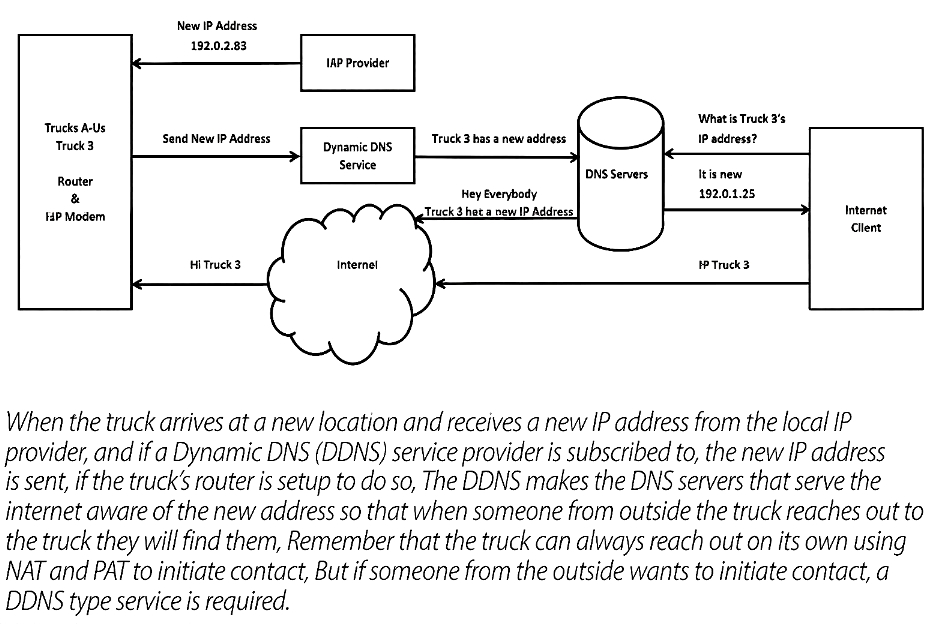
There is another issue unique to remote trucks: You usually move from one ISP provider to another if your connection to the outside world is via some flavor of landline. While your truck might have a wireless WAN provider that is piggybacked onto a cell network, so you are always behind the same ISP, if the venue or client is providing your connection, it’s harder for anyone on the internet to find you, because you are not registered via the new ISP. While you can reach out from the truck and request web pages, email and other services, anyone looking to initiate a connection with you won’t know how to find the temporary ISP IP address currently assigned to you.
The answer is called Dynamic DNS (DDNS), a service that is usually provided by a third party. A router that supports this allows it to automatically determine the IP address it has been assigned and to contact the DDNS service provider with that information. The provider then uses that information to update backbone DNS servers, which propagate out to the rest of the internet. Many routers have clients built in for using some of the most common DDNS providers. If you have a router that doesn’t have the built in client, providers will provide a client to run on a PC.