 Study Plan
2110 Topo
Study Plan
2110 Topo
SDP (Session Description Protocol) Basics for 2110 System Designers
SDP is the “contract” or configuration file that tells receivers exactly how to decode and process each ST 2110 stream. It is one of the most important elements in a 2110 system.
SDP ensures that receivers know the nature of all flows arriving through the IP port. SDP is a protocol that describes communications parameters for streaming media for the purpose of session announcement, session invitation, and parameter negotiation.
Allows end points to negotiate media type, format, and all associated properties, which is called a session profile. SDP provides the information between senders and receivers in multiple applications, and primarily for media applications, including mobile networks.
The control application acquires the desired stream’s SDP file in order to read the provided information description. The control system acquires the SDP file from the sender and sends it to the receiver. One SDP file is present for each flow. Typically the sender will have six (6) SDP files: one (1) for the video flow, four (4) for the audio flows and one (1) for the metadata flow.
To acquire the SDP file, the control system can use the UID to obtain the associated SDP files from the flows. The control system will then build the SDP table (which will include the SDP file information for each device) for each sender. Optionally the files for the receiver can be obtained also.
Video/audio/medatada are typically transported on the same physical network called the media network. Control can also be transported inside the media network -as in-band network- or it can be sent over a different network typically called control network.
It is the control system’s responsibility to maintain an up-to-date SDP. For example, if the format of the source of the encapsulator changes, the control system should implement a mechanism to obtain the new SDP from the encapsulator. Some senders will send a SAP message automatically if something has changed on the sender in order to readapt in consequence. SAP allows a constant update process between the two.
What a Design Engineer Must Know
 SDP file is often referred to as a "blueprint" rather than just a simple configuration file because it acts as a complete technical specification for the stream. It doesn’t just say “here’s the address:” it tells the receiver exactly how to interpret and process the incoming RTP packets.
1. Purpose of SDP in ST 2110
SDP tells the receiver:
- What type of essence it is (video, audio, or ancillary)
- Technical parameters (resolution, sampling rate, channels, etc.)
- Multicast address and port
- Timing and synchronization information
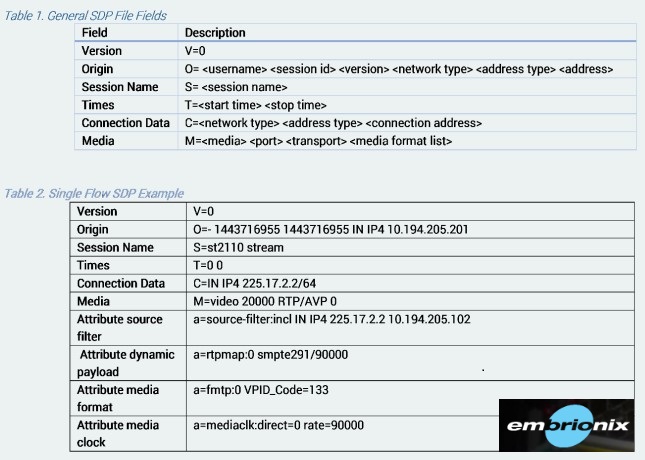
Here is a breakdown of the standard fields found in an ST 2110 SDP file, based on the requirements defined in the ST 2110 suite.
It should be noted here that in modern IP plants, SDPs are dynamically generated and distributed by control software (like NMOS IS-05), and manual entry is the primary cause of configuration drift and sync failures.
Basically the session-level fields set up the "environment" (who/what/where), while the media-level fields define the specific essence constraints (codec/sample rate/PTP sync).
- 1. The Header Fields (Session-Level)
- These fields define the "who, what, and where" of the session.v=0: Indicates the version of SDP. It is always 0.
- o=
: The Origin field. It provides a globally unique identifier for the session. and are often timestamp-based to ensure uniqueness when a stream configuration is updated. - s=
: The Session name. A human-readable identifier for the stream (e.g., "Camera_1_Video"). - t=0 0: The Time field. In ST 2110, this is typically 0 0, meaning the session is permanent and does not have a specific start or stop time.
- 2. The Connection Informationc=IN IP4
/ : - Defines the network connection. It specifies the multicast IP address the receiver needs to join and the Time-to-Live (TTL) of the packets.
- 3. The Media Description (Media-Level)
- This line (m=...) is the heart of the SDP, defining the type of stream.
- m=
: : Type of essence (e.g., video, audio, or application for metadata). :
The UDP destination port for the RTP stream.:
Usually RTP/AVP (Real-time Transport Protocol).:
The RTP payload type number (e.g., 96, 98), which links to the a=rtpmap field. This links the numeric payload type (96) to the actual codec name (e.g., raw for video or jpeg-xs for compressed essence). - 4. Attributes (a=...)Attributes provide the "fine print" that makes ST 2110 work.a=rtpmap:
/ / : - Maps the payload type number to a specific codec and sample rate (e.g., L24/48000/2 for 24-bit audio at 48kHz).
-
a=ts-refclk:ptp=IEEE1588-2008:
: Crucial for ST 2110. It tells the receiver exactly which PTP Grandmaster (by clock ID) the stream is locked to. This allows the receiver to align the stream to the facility's global time. This parameter is extremely important as it field maps the stream to a specific PTP Grandmaster (clock-id), ensuring the receiver aligns the media to the facility-wide master clock. -
a=mediaclk:direct=
: Indicates the relationship between the RTP timestamp and the media clock.a=source-filter: incl IN IP4 : Used to prevent "crosstalk" by forcing the receiver to only accept RTP packets from the specific sender IP address, even if other senders are using the same multicast address. It defines the relationship between the stream's RTP timestamp and the facility's TAI (International Atomic Time) epoch. The a=source-filter attribute is often the "hidden" culprit that causes a receiver to ignore a stream even when the network is technically delivering the packets. - a=ptime:
: Defines the packet time in milliseconds. For audio, this indicates how much audio is packed into one RTP packet (e.g., 1.0 or 0.125).a=framecount: : Often used in audio to define how many samples are in a frame.
2. Key SDP Elements Engineers Must Understand
- m= line — Defines media type and transport (e.g., video, audio, application)
- a=rtpmap — Maps payload type to codec and clock rate (e.g., 90000 for video)
- a=fmtp — Format-specific parameters (critical for 2110-20, 2110-30, 2110-40)
- c= line — Connection information (multicast IP address)
- a=ptime — Packet time (especially important for audio)
3. Practical Setup & Usage Tips
- Always generate and validate SDP files before routing flows.
- Use tools like
sdpoker, Wireshark, or NMOS controllers to inspect SDP. - For video (2110-20): Pay close attention to width, height, sampling, depth, and colorimetry.
- For audio (2110-30): Ensure
ptimeis 1 (1 ms) and clock-rate is 48000. - For ancillary (2110-40): Correct DID/SDID values must be declared (e.g., 0x61/0x01 for CTA-708 captions).
- Keep SDP files under version control — changes can break receivers.
How to Create an SDP File for ST 2110 Streams
An SDP (Session Description Protocol) file is a simple text file that acts as the “instruction manual” for a receiver. It tells the device how to decode and process a 2110 stream.
Basic Steps to Create an SDP File
- Use a text editor (Notepad++, VS Code, etc.)
- Follow the required structure
- Validate the file using tools like
sdpoker, Wireshark, or an NMOS controller
Example SDP Files
1. ST 2110-20 Video (Uncompressed)
	v=0
	o=- 1234567890 1 IN IP4 192.168.1.100
	s=ST2110-20 Video Stream
	m=video 50000 RTP/AVP 96
	c=IN IP4 239.0.0.1
	a=rtpmap:96 raw/90000
	a=fmtp:96 sampling=YCbCr-4:2:2; width=1920; height=1080; depth=10; colorimetry=BT709
	a=ts-refclk:ptp=IEEE1588-2008:127
2. ST 2110-30 Audio
	v=0
	o=- 1234567890 1 IN IP4 192.168.1.100
	s=ST2110-30 Audio Stream
	m=audio 50010 RTP/AVP 97
	c=IN IP4 239.0.0.2
	a=rtpmap:97 L24/48000/2
	a=ptime:1
	a=fmtp:97 channel-order=standard
	a=ts-refclk:ptp=IEEE1588-2008:127
3. ST 2110-40 Ancillary Data (Captions)
	v=0
	o=- 1234567890 1 IN IP4 192.168.1.100
	s=ST2110-40 Ancillary Data
	m=application 50020 RTP/AVP 98
	c=IN IP4 239.0.0.3
	a=rtpmap:98 ancillary/90000
	a=fmtp:98 DID=0x61,SDID=0x01
	a=ts-refclk:ptp=IEEE1588-2008:127
Best Practices for Engineers
- Use consistent multicast addresses and ports
- Always include the
a=ts-refclkline pointing to your PTP domain - Validate SDP files before deployment
- Keep SDP files under version control
Most modern 2110 systems use NMOS IS-05 to generate and exchange SDP files dynamically. Manual SDP creation is mainly used for testing and initial setup.
How SDP Files Are Actually Loaded in Real 2110 Systems
Depending on the device type (camera, PC, switch, multiviewer, etc.), SDP files are loaded in different ways. Here’s how it works in practice:
1. Cameras & Live Sources
- Most modern 2110 cameras do not load external SDP files.
- They generate their own SDP internally based on current settings (resolution, frame rate, etc.).
- The camera announces its SDP via NMOS IS-04 (discovery) so controllers can read it.
2. PCs / Software Endpoints (e.g., vMix, OBS with plugins, FFmpeg, etc.)
- You usually manually load or generate the SDP file.
- Common methods:
- Load a saved
.sdpfile in the software settings - Use command-line tools (e.g., FFmpeg with
-sdp_file) - Generate SDP dynamically via NMOS or control software
- Load a saved
3. Hardware Devices (Multiviewers, Recorders, Processors)
- Most support multiple methods:
- Manual upload via web interface
- Automatic pull via NMOS IS-05 (most common in modern systems)
- Static SDP file loaded through configuration menu
4. Network Switches / Routers
- Switches generally do not load SDP files.
- They only need multicast routing (IGMP/PIM) and QoS configuration.
- SDP is only used by the sender and receiver endpoints.
Modern Best Practice (Recommended)
Most professional 2110 facilities use NMOS (IS-04 + IS-05) for SDP handling:
- Senders publish their SDP via IS-04
- Controllers (or automation systems) use IS-05 to tell receivers which SDP to use
- This allows dynamic routing without manually loading SDP files on every device
For testing and small systems → manually load SDP files.
For real production systems → use NMOS IS-05 for automatic SDP delivery and routing.
SDP is the language that makes ST 2110 streams interoperable. A well-written SDP file is just as important as proper PTP timing and QoS. Always verify SDP correctness before expecting a receiver to successfully decode a stream.
