
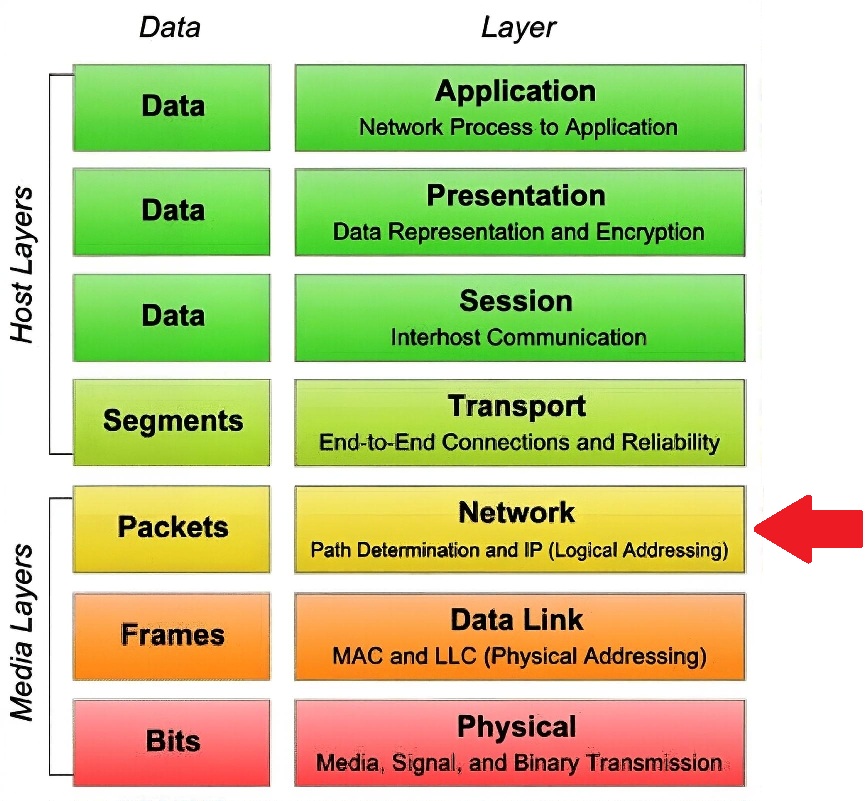
 Study Plan
2110 Topo
Study Plan
2110 Topo
This lesson explains Transitioning from SDI to 2110
• Network Fabric
• Host & NIC Optimization
• The PTP Domain Strategy
• Operational Best Practices
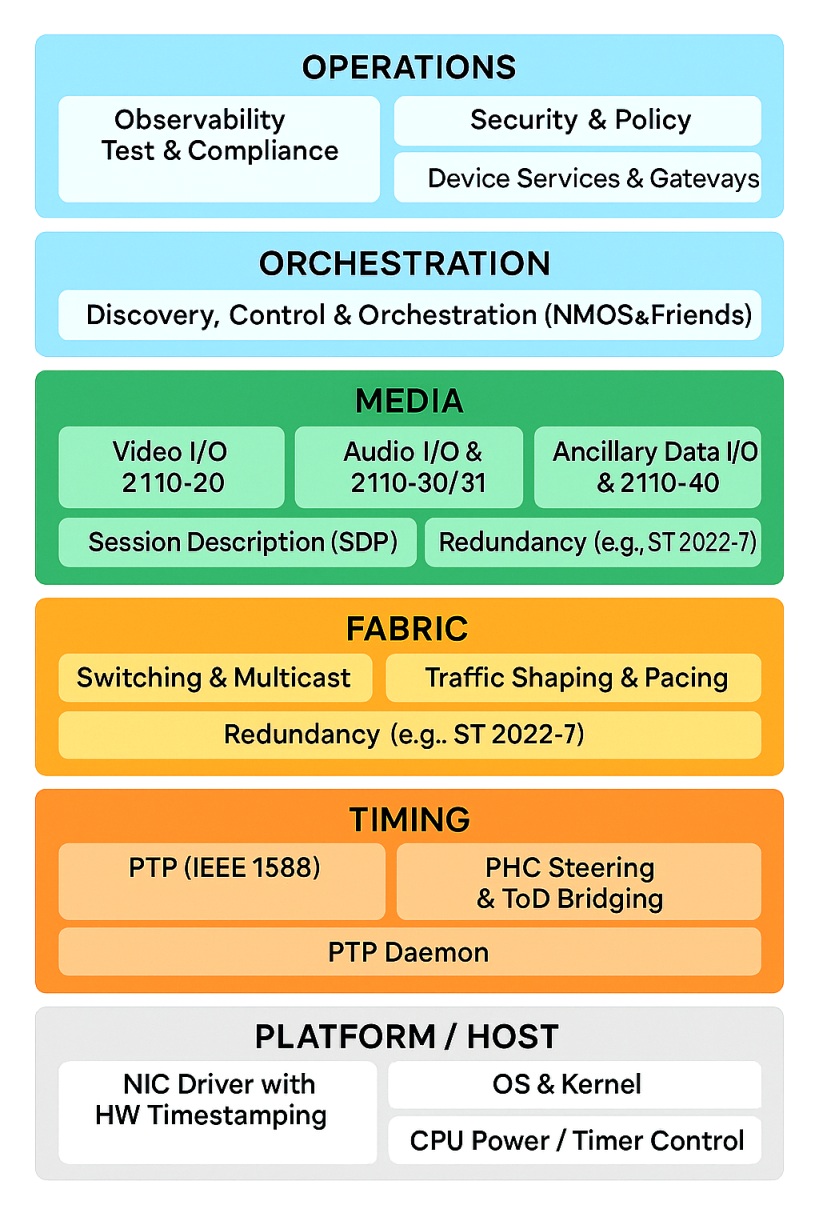
We're now at the on-ramp to SMPTE ST 2110, now that the network plumbing is in place. ST 2110 is an essence-based media system over IP: instead of one SDI “pipe,” it sends separate, time-aligned flows—video (ST 2110-20), audio (ST 2110-30/31), and ancillary data (ST 2110-40)—as RTP multicast over your Ethernet fabric.
Devices maintain perfect phase because PTP per ST 2059 replaces house sync; RTP timestamps are derived from that common clock, so switching, keying, and lip-sync remain deterministic without frame-syncing everything. Routing is no longer a fixed crosspoint. Receivers subscribe to the multicasts you publish, typically via NMOS IS-04/IS-05 (discovery + connection management) instead of patch panels.
Reliability comes from ST 2022-7 seamless protection switching (dual “Red/Blue” networks), plus QoS/DSCP and PTP-aware switches (Boundary/Transparent Clocks) to control jitter and residence delay. Session details ride in SDP; control, tally, events, and audio mapping use NMOS IS-07/08/09/10 as needed.
Practically: if your lower layers provide multicast, QoS, and disciplined PTP, ST 2110 lets you scale from a room to a campus—mixing COTS servers, gateways, cameras, multiviewers, and cloud—while keeping the broadcast timing guarantees you had in SDI, now as software-defined flows.
A good way to become familar with the pieces that make up 2110 is to look at .the parts that comprise it.
 Timing (
| Traffic | DSCP | Decimal | 802.1p CoS (typical) |
|---|---|---|---|
| PTP (timing) | CS6 | 48 | 6 |
| Voice / “expedited” | EF | 46 | 5 |
| 2110 video/audio | CS5 / AF41 | 40 / 34 | 5 / 4 |
| Control/management | CS3 / CS2 | 24 / 16 | 3 / 2 |
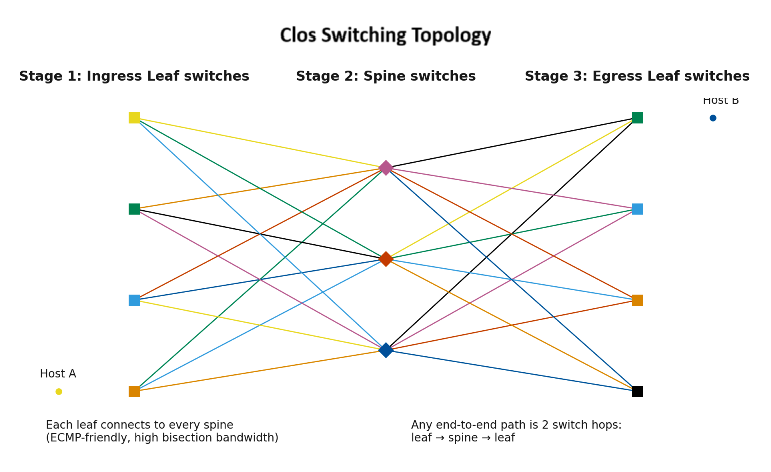 Non-Blocking Fabric: Spine-leaf ensures that any "leaf" (where your cameras/servers are) can talk to any other leaf with consistent, predictable bandwidth.
| Component | Recommendation | Key Settings |
|---|---|---|
| Hardware | ConnectX-6 Dx
?
The ConnectX-6 Dx is an advanced Ethernet adapter card from NVIDIA (formerly Mellanox) designed for demanding data center and media workloads. It provides:
Up to 2 ports of 100GbE or 1 port of 200GbE Ethernet connectivity. PCIe Gen4 x16 host interface (with excellent bandwidth headroom). It is one of the most popular NICs in the broadcast industry for SMPTE ST 2110 deployments because it offers strong hardware offloads specifically beneficial for uncompressed or lightly compressed video, audio, and ancillary data over IP. |
Use PCIe Gen4 x8 for maximum headroom |
| Driver | WinOF-2 (LTS Build) | Match firmware version strictly to the driver |
| MTU | 9014 | Must match your network's end-to-end MTU |
| Offloads | Disabled | Disable LRO/RSC (don't coalesce UDP media packets) |
| Pacing | Hardware-Assisted | Vital for smooth delivery of uncompressed video |
Discovery: Utilize NMOS IS-04 (Discovery) and IS-05 (Connection) to replace physical patch panels with software-defined routing.
Acceptance Testing: Before going live, perform a "path pull" test to verify that ST 2022-7 stays hitless when one network path is disconnected.
