
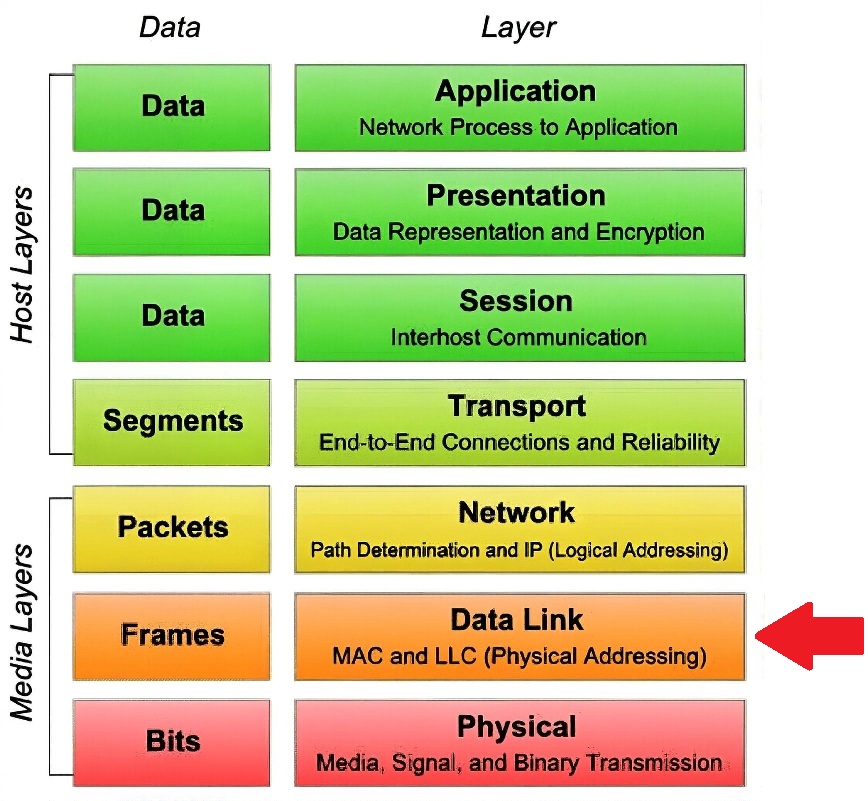
 Study Plan
2110 Topo
Study Plan
2110 Topo
This lesson explains VLANs and Managed Switches and how they fit into the SMPTE ST 2110 stack.
• Broadcast Domains
• VLANs
• Trunking
• Port Types
• IGMP Snooping
• Flow Control
• Troubleshooting MAC Issues
• Managed Switches
• Local vs. External Authentication Servers
• MAC Address Restrictions
• When to Use Which
• Link Aggregation
• Authentication on Managed Switches
One of the most powerful features of modern Ethernet switches is the ability to create Virtual LANs (VLANs). VLANs let you logically segment a network, breaking up large broadcast domains into smaller, more manageable ones — even though everything is still connected to the same physical switches.
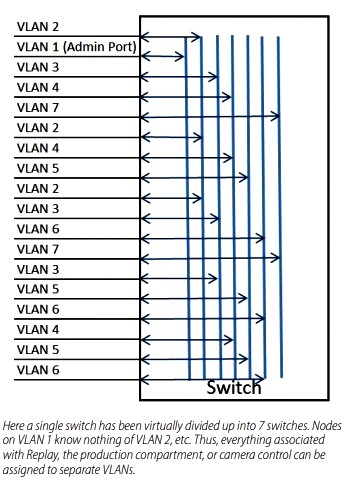
 Think of a VLAN
as its own little isolated broadcast domain, much like a separate subnet at Layer 2. In many ways, it's similar to a workgroup: devices in the same VLAN can talk to each other directly at the Data Link Layer (Layer 2), but devices in different VLANs can't see or communicate with each other at Layer 2 — they need a router (Layer 3 device) to connect between them.
Think of a VLAN
as its own little isolated broadcast domain, much like a separate subnet at Layer 2. In many ways, it's similar to a workgroup: devices in the same VLAN can talk to each other directly at the Data Link Layer (Layer 2), but devices in different VLANs can't see or communicate with each other at Layer 2 — they need a router (Layer 3 device) to connect between them.
A VLAN is simply a logical grouping of users and resources tied to specific switch ports that you define administratively. This means a single switch can support multiple separate networks (e.g., one for trucks in a control room, one for production, one for graphics), all without any of them seeing each other's traffic at Layer 2. Each VLAN requires its own IP subnet when you move to Layer 3 routing.
Without VLANs, a switch acts as one big broadcast domain (every broadcast floods everywhere), though each port is still its own collision domain in full-duplex mode. With VLANs, the VLAN membership of a device depends entirely on which switch port it's plugged into — and you can assign ports statically (manual admin configuration) or dynamically.
Dynamic VLAN assignment
is pretty cool: the switch can look up a database (like a VLAN Management Policy Server, or VMPS) and assign a VLAN based on the device's MAC address, the protocol in use, or even the application. When a device connects, the port automatically gets placed in the right VLAN — no manual config needed per port.
Switches can also share VLAN info dynamically using protocols like
GVRP
GVRP (GARP VLAN Registration Protocol), also known as Generic VLAN Registration Protocol, is a standards-based Layer 2 protocol (defined in IEEE 802.1Q) that allows switches to dynamically share and manage VLAN information across a network.
It is an application of GARP (Generic Attribute Registration Protocol), which provides the framework for registering and deregistering attributes (like VLAN IDs) between devices.
Switches advertise their configured (static) VLANs via GVRP messages over 802.1Q trunk links.
Neighbor switches receive these messages and can:
Automatically register (join) those VLANs on their ports.
Create dynamic VLANs if supported.
Prune (block) unnecessary VLAN traffic on trunks where no devices need it
(similar to VLAN pruning).
This propagation happens automatically — you only need to configure VLANs on one switch, and GVRP spreads the info to others, reducing manual configuration and preventing unnecessary broadcast/unicast flooding.
(GARP VLAN Registration Protocol), which lets them propagate VLAN configurations from one switch to another or from a server.
Most switches let you rename VLANs for clarity (e.g., change VLAN 2 to "Graphics"). Historically, VLAN 1 couldn't be renamed or deleted on many devices (especially older Cisco ones), so it was often reserved for management or native/admin traffic.
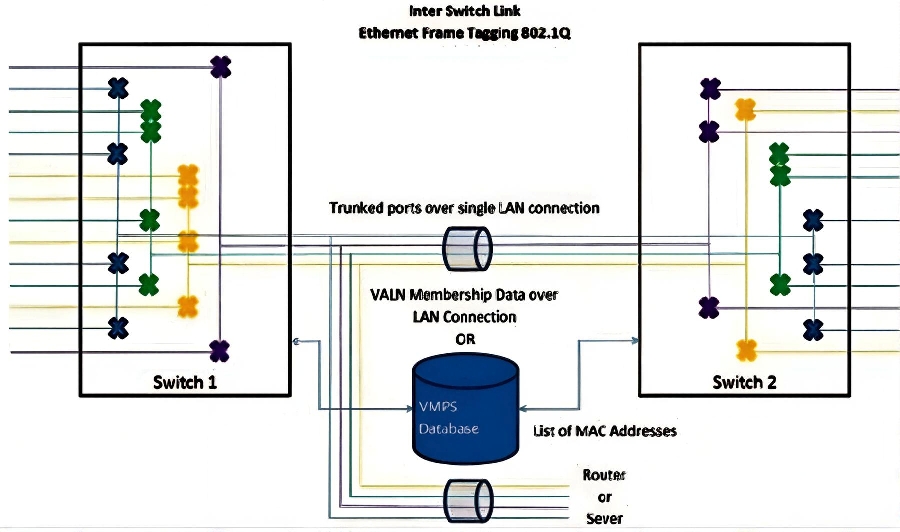
To make VLANs
work across multiple switches, we use trunking. A trunk port carries traffic for multiple VLANs over a single link (usually Fast Ethernet or Gigabit), using IEEE 802.1Q tagging — it inserts a small tag field into the Ethernet frame with the VLAN ID (up to 4094 VLANs possible). Trunks are point-to-point links between switches, or between a switch and a router/server that supports tagging. This way, VLANs can span the entire network. A server on a trunk port can even serve multiple VLANs without needing a router in between.
A switch
port is typically either:
Cisco's old proprietary ISL (Inter-Switch Link) encapsulation was another way to trunk, but it's largely deprecated in favor of the standard 802.1Q. Dynamic Trunking Protocol (DTP) can negotiate trunking mode automatically between ports, though many admins disable it for security.
Don't confuse VLANs with VPNs: VLANs are for local segmentation inside your network; VPNs are for secure remote connections over WANs.
For security on
access ports, you can lock them down further with features like port security — limiting which MAC addresses are allowed, setting a max number of devices, and defining violation actions (protect/drop frames, restrict/log, or shutdown the port). This is especially useful on "access mode" ports to prevent unauthorized devices from plugging in.
Many Layer 2 switches today also have Layer 3 features built in, like handling ARP (IP-to-MAC mapping), so pure Layer 2-only devices are becoming less common.
IGMP Snooping
Switches handle multicast traffic (like video streaming or IPTV) efficiently with
IGMP
snooping. Without it, multicast packets flood every port in the VLAN (wasting bandwidth and risking DoS attacks). IGMP snooping listens to IGMP join/leave messages between hosts and routers, then forwards multicast only to interested ports — improving performance, reducing congestion, and boosting security.
Flow Control (IEEE 802.3x)
On full-duplex links,
flow control
Flow control in IEEE 802.3 (Ethernet) is a mechanism that prevents a receiving device from being overwhelmed by incoming frames when its buffers are filling up, especially on full-duplex links.
Operates only on full-duplex Ethernet (not half-duplex, where CSMA/CD handles collisions instead).
Uses special PAUSE frames (MAC control frames) sent from the receiver to the sender.
The PAUSE frame contains:
A reserved multicast destination MAC address: 01-80-C2-00-00-01
Opcode: 0x0001
Pause time: a 2-byte value (in units of 512 bit times) telling the sender how long to stop transmitting (max 65,535 × 512 bit times ≈ 33.5 ms at 1 Gbps).
When the receiver's buffers are nearing full, it sends a PAUSE frame with a non-zero pause time.
The sender stops transmitting data frames for that duration (but can still send PAUSE frames itself).
When the pause time expires or the receiver sends a PAUSE frame with 0 time, transmission resumes.
uses special PAUSE frames to temporarily stop a sender when the receiver's buffers are filling up (e.g., during bursts). The receiver sends a PAUSE frame (to a reserved multicast MAC), telling the sender to hold off for a set time. This prevents packet drops due to congestion, though it's link-level only (not end-to-end) and can sometimes cause head-of-line blocking in QoS environments — many admins disable it unless needed.
Important: Link-local only — doesn't propagate end-to-end (only between directly connected devices).
CAM is
Content Addressable Memory.
CAM is also sometimes called Content Associative Memory). It's a special type of high-speed hardware memory used in Ethernet switches that allows very fast lookups based on the content of the data (e.g., a MAC address) rather than a traditional numeric memory address.
Unlike regular RAM (where you give it an address and get back data), CAM works in reverse: you give it the data (like a destination MAC address), and it instantly searches the entire memory in parallel to tell you if/where that data is stored (e.g., "this MAC is on port Gi0/5 in VLAN 10"). This happens in a single clock cycle, making forwarding decisions lightning-fast — essential for wire-speed switching.
The switch's MAC address table (also commonly called the CAM table) is the actual database stored in this CAM hardware. It maps:
MAC addresses (source or learned) to
Switch ports (where the device was seen), and
VLANs (since VLANs segment the network)
How It Works in Practice. When a frame arrives on a port, the switch records the source MAC and the incoming port/VLAN in the CAM table (dynamic learning). When forwarding, if the destination MAC is found in the CAM table → forward the frame only out the associated port (efficient unicast). If not found → flood the frame out all ports in the VLAN (unknown unicast flooding). Entries expire after a timeout (default 300 seconds on Cisco) if no traffic is seen from that MAC, keeping the table fresh and preventing it from filling up.
The switch's MAC address table (also called CAM table) maps MACs to ports/VLANs for fast forwarding. Common problems include:
Managed switches often include powerful port-based authentication features to control which devices can access your network — especially important for edge ports facing users, guests, or external connections.
The most common and secure modern method is IEEE 802.1X (often just called "dot1x" or "port-based network access control"). This standard requires devices (called supplicants) to authenticate before the switch port grants full network access. Here's how it typically works:
This is the gold standard for securing access ports in enterprise networks — far better than simple MAC filtering or nothing at all.
The simplest (but least scalable and secure) way is to store credentials locally on the switch itself — basically a small database of usernames/passwords tied to specific ports. This works for very small setups but doesn't scale well and lacks centralized management.
More commonly
(and recommended for anything beyond a tiny network), switches use external
AAA servers
AAA servers (pronounced "triple-A") are centralized servers that provide Authentication, Authorization, and Accounting services for controlling access to networks, devices, or resources. They form the backbone of secure network access management in enterprise environments, replacing scattered local credentials with a single, manageable point of control.
The Three "A"s Explained
Authentication — Verifies who you are.
The server checks your credentials (username/password, certificates, tokens, etc.) against a database to confirm your identity.
Only after successful authentication does the process move forward.
Authorization — Determines what you can do.
Once identified, the server enforces policies: Which resources, commands, or services are you allowed to access?
For example: "This user can run show commands but not configure changes" or "Grant access to VLAN 10 but not VLAN 20."
Accounting — Tracks what you did.
Logs user activity for auditing, billing, compliance, or troubleshooting: login/logout times, commands executed, data transferred, session duration, etc.
This creates an audit trail that's invaluable for security investigations or regulatory requirements.
We look at common protocols next.
:
Quick comparison
(RADIUS vs TACACS+):
Fallback/Alternative Methods for Non-802.1X Devices
Not all devices support 802.1X (e.g., printers, IP cameras, legacy IoT). For those, common options include:
MAC Authentication Bypass (MAB): The switch learns the device's MAC address from the first packet, treats it as the "username" (and often the same for password), and checks it against the RADIUS server. If allowed, the port opens. It's a fallback after 802.1X fails (or standalone). Not super secure (MACs are easy to spoof), but better than nothing — often combined with 802.1X for hybrid setups.
Other enhancements:
Guest VLANs, restricted VLANs, or critical-auth VLANs (if RADIUS is down).
Re-authentication timers, periodic challenges, etc.
On ports requiring authentication, you can often specify handling for management protocols like:
Telnet (insecure — avoid!)
SSH (Secure Shell — recommended for encrypted CLI access)
HTTP/HTTPS (web management — prefer HTTPS)
You define which authentication method (local, RADIUS, TACACS+) applies to each, and many switches let you set fallback orders (e.g., try RADIUS first, then local).
In summary: For user/device network access on switch ports → go with 802.1X + RADIUS (with MAB fallback for legacy stuff). For admin access to the switch itself → TACACS+ is often preferred in Cisco-heavy environments for its security and granularity. Always use strong shared secrets, protect the links (e.g., don't send over untrusted networks), and consider modern enhancements like certificate-based EAP for even stronger security.
Setting up and organizing the IP networking infrastructure involves configuring the managed switches along with routers in the layer above (which we'll cover next). Sample Switch Setup
Unmanaged switches are plug-and-play: they forward traffic based solely on MAC addresses with no extra features. Managed switches, on the other hand, give you much more control — you can set up VLANs for segmentation, implement security features like port authentication, monitor traffic, apply QoS, and more. The downside is they require more initial setup and ongoing management.
Switches don't have to operate independently — many can be stacked to function as a single logical unit (a "super switch"). This simplifies management (one IP address, one config) and increases port density.
Stack topologies:
Managed switches include tools to handle common issues and optimize performance:
Broadcast Storm Mitigation (Storm Control)
Broadcast storms (from loops, malware, or misconfigs) can overwhelm the network. Storm control monitors broadcast/multicast/unknown-unicast traffic rates (as % of bandwidth or pps) and suppresses excess packets — dropping them, logging, or even shutting down the port (with auto-recovery). Enable it on access ports (e.g., 5–20% threshold) to limit damage without stopping legitimate traffic.
STP/RSTP
STP (Spanning Tree Protocol) and RSTP (Rapid Spanning Tree Protocol) are Layer 2 protocols that prevent loops in Ethernet networks with redundant links, while ensuring a single, loop-free path for traffic.
STP (IEEE 802.1D – original, 1990). Purpose: Creates a loop-free logical topology by blocking redundant paths.How it works (key steps):
Elects a Root Bridge — the switch with the lowest Bridge ID (priority + MAC address). Selects Root Ports on each non-root switch — best (lowest-cost) path to the root. Selects Designated Ports — one per segment, the best path from that segment to the root. Blocks all other ports to break loops.
Port states: Blocking → Listening → Learning → Forwarding (or Disabled). Convergence time: 30–50 seconds (very slow) — includes Listening (15s) + Learning (15s) timers. Still used today mostly for backward compatibility.
RSTP (IEEE 802.1w – 2001, "Rapid" STP). Improved version of STP — same goal, much faster. Key enhancements:
Only 3 port roles/states: Root, Designated, Alternate/Backup (no separate Listening/Learning). Faster convergence: Typically 3–6 seconds (often under 1 second in good conditions). Uses Proposal/Agreement handshakes for rapid transition to Forwarding. Link-type awareness — point-to-point links (full-duplex) transition instantly. Backward compatible with STP (but a single legacy STP switch slows the whole network). Modern default — Almost all switches run RSTP (or its variants) today.
helps prevent loops at the source, but
storm control
How Storm Control Works
The switch monitors the rate of these "stormy" frame types on each port (measured in packets per second (pps) or percentage of interface bandwidth).
If the rate exceeds a configured threshold (e.g., 5% of port speed or 1000 pps), the switch takes action:
Drops excess packets silently (most common).
Logs the event (syslog/SNMP trap).
Shuts down the port temporarily or permanently (with auto-recovery in some cases).
Once the rate drops below a lower hysteresis threshold (usually 50–80% of the upper limit), normal forwarding resumes.
Without storm control, a broadcast storm (e.g., from a loop, malware, or misconfigured device) can flood the entire VLAN, causing:
High CPU usage on switches. Slow or no legitimate traffic. Network-wide outages.
Common triggers: STP loops, faulty NICs sending endless broadcasts, or viruses like the old "Blaster" worm.
adds extra protection.
MAC Address Restrictions (Port Security vs. ACLs)
Port security
and MAC-based ACLs are two powerful tools on managed switches to control who (or what) can connect to a network port and to protect against unauthorized access or attacks. Here's a clear, expanded explanation of each, including how they work, their differences, and when to use them.
Example (Cisco-style config):
interface GigabitEthernet0/1
switchport mode access
switchport port-security
switchport port-security maximum 2 ! Allow up to 2 MACs (e.g., PC + IP phone)
switchport port-security mac-address sticky ! Learn and save the first two MACs
switchport port-security violation shutdown ! Most secure action
Violation Actions
(what happens when an unauthorized MAC appears)
Shutdown — Port goes into err-disabled state (administratively down). Most secure; requires manual re-enable or auto-recovery.
Restrict — Drops offending frames, logs the violation, and sends SNMP traps/syslog. Port stays up for legitimate traffic.
Protect — Silently drops offending frames only. No logging or traps — least visible, but still blocks intruders.
Port security is lightweight, hardware-accelerated, and very efficient — ideal for access/edge ports where you want simple, strong protection against rogue devices or MAC spoofing/flooding.
| ACL Type | Layer | Filters On | Typical Use Case |
|---|---|---|---|
| Standard | 3 | Source IP only | Basic filtering near destination |
| Extended | 3 | Source/Dest IP, protocol, ports | Precise control near source |
| MAC-based / Port | 2 | Source/Dest MAC, EtherType | Switch port lockdown, non-IP traffic |
| VLAN (VACL) | 2/3 | Traffic within/across VLANs | VLAN-level security on switches |
Key Characteristics
| Feature | Port Security | MAC-based ACLs (Port ACLs) |
|---|---|---|
| Primary goal | Limit number of MACs / prevent unauthorized devices | Filter/allow/deny specific MAC flows |
| Flexibility | Low (count-based) | High (rule-based, source/dest/EtherType) |
| Resource usage | Very low (hardware-accelerated) | Higher (uses TCAM, can impact performance) |
| Applies to | Access ports only | Access or trunk ports, VLAN interfaces |
| Handles non-IP traffic | Yes (all traffic) | Yes (focus on MAC/EtherType) |
| Best for | Edge/user ports, simple security | Complex filtering, non-IP protocols |
| Attack protection | Excellent vs. MAC flooding & rogue devices | Good for targeted MAC denial |
| Typical use case | Office desks, guest ports | Legacy industrial networks, specific protocol control |
When to
use which?
In summary:
Port security is your go-to, lightweight "lock the door" feature for everyday port protection.
MAC-based ACLs are the more advanced "custom filter" for special cases, at the cost of more configuration and resources. Both are excellent tools for hardening Layer 2 security!
Port Speed, Duplex, and Auto-Negotiation
Ports can be set to specific speeds (10/100/1000 Mbps) and duplex (half/full), or left on auto-negotiation (default/recommended). Auto uses Fast Link Pulses (FLP) to agree on the best common mode (higher speed/full duplex preferred). Hard-coding one side often causes mismatches (e.g., auto side defaults to half-duplex for 10/100), leading to errors/poor performance. Use auto unless troubleshooting a specific incompatibility.
Link
Aggregation (LAG / EtherChannel / Port Channel)
Bundle multiple ports for higher bandwidth (e.g., 2×1G = ~2G) and redundancy.
| Feature | Static LAG (Manual) | LACP (Dynamic) |
|---|---|---|
| Configuration | Manual on both ends | Negotiated |
| Failure detection | Manual or slow | Fast (seconds) |
| Loop risk | Higher if miswired | Low |
| Interoperability | Vendor-specific | Standard (802.1AX) |
| Recommended use | Simple, trusted links | Most production environments |
Requirements: All member ports must match speed, duplex, VLAN membership (same access/trunk/hybrid), and other settings (MTU, flow control). Ports in a LAG act as one logical interface for forwarding/STP/VLANs.
Authentication on Managed Switches
Secure ports
with 802.1X (port-based network access control) — devices must authenticate before full access.
| Feature | EAP (General) | EAP-TLS | PEAP (typically PEAP-MSCHAPv2) |
|---|---|---|---|
| Authentication type | Framework (supports many) | Mutual certificates | Server certificate + username/password inside tunnel |
| Client certificate | Depends on method | Required | Not required |
| Security level | Varies | Highest (certificate-based) | Good, but password-dependent |
| Deployment complexity | Varies | Higher (needs PKI) | Lower (uses existing credentials) |
| Common use | All 802.1X | High-security, managed devices | General enterprise Wi-Fi/wired |
Configure per-port: enable 802.1X, point to RADIUS server(s), define methods (e.g.,
dot1x + MAB
dot1x + MAB is a common hybrid authentication strategy used on switch ports (especially Cisco switches) to secure network access while handling both 802.1X-capable and non-802.1X-capable devices.
Breakdown: dot1x (short for IEEE 802.1X)
This is the primary, strongest method: port-based network access control. The switch blocks the port until the connected device (supplicant) successfully authenticates with a central server (usually RADIUS). Authentication uses EAP methods (e.g., EAP-PEAP, EAP-TLS with certificates, EAP-FAST).
Once authenticated, the port opens and the device gets network access (often with VLAN assignment, ACLs, etc.).
Ideal for laptops, desktops, VoIP phones, and other devices that support 802.1X.
MAB (MAC Authentication Bypass)
This is the fallback method for devices that do not support 802.1X (e.g., printers, IP cameras, legacy IoT devices, some older VoIP phones). If 802.1X authentication fails (or times out after no response), the switch automatically takes the device's MAC address from the first frame it sends. The switch treats the MAC as both username and password (or just username, depending on config) and sends it to the RADIUS server.
If the RADIUS server has that MAC in its database (e.g., in a whitelist), it authenticates the device and grants access (often to a restricted VLAN or with limited privileges). If the MAC is unknown → access is denied or placed in a guest/quarantine VLAN.
), and handle failures (guest VLAN, critical VLAN). The switch (authenticator) relays EAP to RADIUS; both need credentials configured.
How "dot1x + MAB" Works Together.
Device plugs in → switch starts 802.1X authentication (sends EAP-Request-Identity).
If the device responds and authenticates successfully → full access granted (dot1x wins).
If no 802.1X response (timeout) → switch falls back to MAB.
Switch sends the MAC to RADIUS → if approved → access granted via MAB.
If MAB also fails → port stays blocked or moves to a guest/unauthenticated VLAN.
Why Use This Combination?
Provides strong security for 802.1X-capable devices (certificate or credential-based).
Avoids completely blocking legacy or non-interactive devices.
Balances security and usability — common in enterprise wired networks.
Often configured with additional fallbacks like guest VLAN or critical-auth VLAN (if RADIUS is down).
Example Cisco Config Snippet
interface GigabitEthernet0/1
authentication port-control auto
authentication order dot1x mab
authentication priority dot1x mab
mab
dot1x pae authenticator
In short: dot1x + MAB means "try strong 802.1X first; if that fails, fall back to MAC-based authentication" — a practical, widely deployed approach to secure ports without breaking connectivity for older or IoT devices.
RADIUS → Best for network access (users/devices connecting to the network).
RADIUS is the go-to protocol for securely authenticating users/devices before granting network access, and it's the standard backend for most 802.1X port authentication setups on switches.
TACACS+ → Best for device administration (admins logging into switches/routers).
TACACS+ is the go-to protocol when you need strong, encrypted, highly granular control over who can configure or manage your network devices.
